Today I want to talk about data transfer objects, a software pattern you can use to keep your code better structured and metaphorically coherent.
I’ll define those terms a little better, but first I want to start with a conceptual analogy.
It is a simple truth that, no matter whether you focus on the frontend, the backend or the whole stack, everyone hates CSS.
I kid, but also, I don’t.
CSS is probably among the most reviled of technologies we have to use all the time. The syntax and structure of CSS seems almost intentionally designed to make it difficult to translate from concept to “code,” even simple things. Ask anyone who’s tried to center a div.
And there are all sorts of good historical reasons why CSS is the way it is, but most developers find it extremely frustrating to work with. It’s why we have libraries and frameworks like Tailwind. And Bulma. And Bootstrap. And Material. And all the other tools we use that try their hardest to make sure you never have to write actual while still reaping the benefits of a presentation layer separate from content.
And we welcome these tools, because it means you don’t need to understand the vagaries of CSS in order to get what you want.
It’s about developer experience, making it easier on developers to translate their ideas into code.
And in the same way we have tools that cajole CSS into giving us what we want, I want to talk about a pattern that allows you to not worry about anything other than your end goal when you’re building out the internals of your application. It’s a tool that can help you stay in the logical flow of your application, making it easier to puzzle through and communicate about the code you’re writing, both to yourself and others. I’m talking about DTOs.
DTOs
So what is a DTO? Very simply, a data transfer object is a pure, structured data object - that is, an object with properties but no methods. The entire point of the DTO is to make sure that you’re only sending or receiving exactly the data you need to accomplish a given function or task - no more, no less. And you can be assured that your data is exactly the right shape, because it adheres to a specific schema.
And as the “transfer” part of the name implies, a DTO is most useful when you’re transferring data between two points. The title refers to one of the more common exchanges, when you’re sending data between front- and back-end nodes, but there are lots of other scenarios where DTOs come in handy.
Sending just the right amount of data between modules within your application, or consuming data from different sources that use different schemas, are just some of those.
I will note there is literature that suggests the person who coined the term, Martin Fowler, believes that you should not have DTOs except when making remote calls. He’s entitled to his opinion (of which he has many), but I like to reuse concepts where appropriate for consistency and maintainability.
The DTO is one of my go-to patterns, and I regularly implement it for both internal and external use.
I’m also aware most people already know what pure data objects are. I’m not pretending we’re inventing the wheel here - the value comes in how they’re applied, systematically.
Advantages
-
For DTOs are a systematic approach to managing how your data flows through and between different parts of your application as well as external data stores.
-
Properly and consistently applied, DTOs can help you maintain what I call metaphorical coherence in your app. This is the idea that the names of objects in your code are the same names exposed on the user-facing side of your application.
Most often, this comes up when we’re discussing domain language - that is, your subject-matter-specific terms (or jargon, as the case may be).
I can’t tell you the number of times I’ve had to actively work out whether a class with the name of “post” refers to a blog entry, or the action of publishing an entry, or a location where someone is stationed. Or whether “class” refers to a template for object creation, a group of children, or one’s social credibility. DTOs can help you keep things organized in your head, and establish a common vernacular between engineering and sales and support and even end-users.
It may not seem like much, but that level of clarity makes talking and reasoning about your application so much easier because you don’t have to jump through mental hoops to understand the specific concept you’re trying to reference.
-
DTOs also help increase type clarity. If you’re at a shop that writes Typescript with “any” as the type for everything, you have my sympathies, and also stop it. DTOs might be the tool you can wield to get your project to start to use proper typing, because you can define exactly what data’s coming into your application, as well as morphing it into whatever shape you need it to be on the other end.
-
Finally, DTOs can help you keep your code as modular as possible by narrowing down the data each section needs to work with. By avoiding tight coupling, we can both minimize side effects and better set up the code for potential reuse.
And, as a bonus mix of points two and four, when you integrated with an external source, DTOs can help you maintain your internal metaphors while still taking advantage of code or data external to your system.
To finish off our quick definition of terms, a reminder that PascalCase is where all the words are jammed together with the first letter of each word capitalized; camelCase is the same except the very first letter is lowercase; and snake case is all lowercase letters joined by underscores.
This is important for our first example.
Use-case 1: FE/BE naming conflicts
The first real-world use-case we’ll look at is what was printed on the box when you bought this talk. That is, when your backend and frontend don’t speak the same language, and have different customs they expect the other to adhere to.
Trying to jam them together is about as effective as when an American has trouble ordering food at a restaurant in Paris and compensates by yelling louder.
In this example, we have a PHP backend talking to a Typescript frontend.
I apologize for those who don’t know one or both languages. For what it’s worth, we’ll try to keep the code as simple as possible to follow, with little-to-no language-specific knowledge required. In good news, DTOs are entirely language agnostic, as we’ll see as we go along.
Backend
class User { public function __construct( public int $id, public string $full_name, public string $email_address, public string $avatar_url ){} }
Per PSR-12, which is the coding standard for PHP, class cases must be in PascalCase, method names must be implemented in camelCase. However, the guide “intentionally avoids any recommendation” as to styling for property names, instead just choosing “consistency.”
Very useful for a style guide!
As you can see, the project we’re working with uses snake case for its property names, to be consistent with its database structure.
Frontend
`class User {
userId: number;
fullName: string;
emailAddress: string;
avatarImageUrl: string;
load: (userId: number) => {/* load from DB /};
save: () => {/ persist */};
}`
But Typescript (for the most part, there’s not really an “official” style guide in the same manner but most your Google, your Microsofts, your Facebooks tend to agree) that you should be using camelCase for your variable names.
I realize this may sound nit-picky or like small potatoes to those of used to working as solo devs or on smaller teams, but as organizations scales up consistency and parallelism in your code is vital to making sure both that your code and data have good interoperability, as well as ensuring devs can be moved around without losing significant chunks of time simply to reteach themselves style.
Now, you can just choose one of those naming schemes to be consistent across the frontend and backend, and outright ignore one of the style standards.
Because now your project asking one set of your developers to context-switch specifically for this application. It also makes your code harder to share (unless you adopt this convention-breaking in your extended cinematic code universe). You’ve also probably killed a big rule in your linter, which you now have to customize in all implementations.
OR, we can just use DTOs.
Now, I don’t have a generic preference whether the DTO is implemented on the front- or the back-end — that determination has more to do with your architecture and organizational structure than anything else.
Who owns the contracts in your backend/frontend exchange is probably going to be the biggest determiner - whichever side controls it, the other is probably writing the DTO. Though if you’re consuming an external data source, you’re going to be writing that DTO on the frontend.
Where possible, I prefer to send the cleanest, least amount of data required from my backend, so for our first example we’ll start there. Because we’re writing the DTO in the backend, the data we send needs to conform to the schema the frontend expects - in this instance, Typescript’s camel case.
Backend
class UserDTO { public function __construct( public int $userId, public string $fullName, public string $emailAddress, public string $avatarImageUrl ) {} }
That was easy, right? We just create a data object that uses the naming conventions we’re adopting for sharing data. But of course, we have to get our User model into the DTO. This brings me to the second aspect of DTOs, the secret sauce - the translators.
Translators
function user_to_user_dto(User $user): UserDTO { return new UserDTO( $user->id, $user->full_name, $user->email_address, $user->avatar_url ); }
Very simply, a translator is the function (and it should be no more than one function per level of DTO) that takes your original, nonstandard data and jams it into the DTO format.
Translators get called (and DTOs are created) at points of ingress and egress. Whether that’s internal or external, the point at which a data exchange is made is when a translator is run and a DTO appears – which side of the exchange is up to your implementation.
You may also, as the next example shows, just want to include the translator as part of the DTO.
Using a static create method allows us to keep everything nice and contained, with a single call to the class.
`class UserDTO
{
public function __construct(
public int $userId,
public string $fullName,
public string $emailAddress,
public string $avatarImageUrl
) {}
public static function from_user(User $user): UserDTO
{
return new self(
$user->id,
$user->full_name,
$user->email_address,
$user->avatar_url
);
}
}
$userDto = UserDTO::from_user($user);`
I should note we’re using extremely simplistic base models in these examples. Often, something as essential as the user model is going to have a number of different methods and properties that should never get exposed to the frontend.
While you could do all of this through customizing the serialization method for your object. I would consider that to be a distinction in implementation rather than strategy.
An additional benefit of going the separate DTO route is you now have an explicitly defined model for what the frontend should expect. Now, your FE/BE contract testing can use the definition rather than exposing or digging out the results of your serialization method.
So that’s a basic backend DTO - great for when you control the data that’s being exposed to one or potentially multiple clients, using a different data schema.
Please bear with me - I know this probably seems simplistic, but we’re about to get into the really useful stuff. We gotta lay the groundwork first.
Frontend
Let’s back up and talk about another case - when you don’t control the backend. Now, we need to write the DTO on the frontend.
First we have our original frontend user model.
`class User {
userId: number;
fullName: string;
emailAddress: string;
avatarImageUrl: string;
load: (userId: number) => {/* load from DB /};
save: () => {/ persist */};
}`
Here is the data we get from the backend, which I classify as a Response, for organizational purposes. This is to differentiate it from a Payload, which data you send to the API (which we’ll get into those later).
interface UserResponse { id: number; full_name: string; email_address: string; avatar_url: string; }
You’ll note, again, because we don’t control the structure used by the backend, this response uses snake case.
So we need to define our DTO, and then translate from the response.
Translators
You’ll notice the DTO looks basically the same as when we did it on the backend.
interface UserDTO { userId: number; fullName: string; emailAddress: string; avatarImageUrl: string; }
But it's in the translator you can now see some of the extra utility this pattern offers.
const translateUserResponseToUserDTO = (response: UserResponse): UserDTO => ({ userId: response.id, fullName: response.full_name, emailAddress: response.email_address, avatarImageUrl: response.avatar_url });
When we translate the response, we can change the names of the parameters before they ever enter the frontend system. This allows us to maintain our metaphorical coherence within the application, and shield our frontend developers from old/bad/outdated/legacy code on the backend.
Another nice thing about using DTOs in the frontend, regardless of where they come from, is they provide us with a narrow data object we can use to pass to other areas of the application that don’t need to care about the methods of our user object.
DTOs work great in these cases because they allow you to remove the possibility of other modules causing unintended consequences.
Notice that while the User object has load and save methods, our DTO just has the properties. Any modules we pass our data object are literally incapable of propagating manipulations they might make, inadvertently or otherwise. Can’t make a save call if the object doesn’t have a save method.
Use-case 2: Metaphorically incompatible systems
For our second use-case, let’s talk real-world implementation. In this scenario, we want to join up two systems that, metaphorically, do not understand one another.
Magazine publisher
-
Has custom backend system (magazines)
-
Wants to explore new segment (books)
-
Doesn’t want to build a whole new system
I worked with a client, let’s say they’re a magazine publisher. Magazines are a dying art, you understand, so they want to test the waters of publishing books.
But you can’t just build a whole new app and infrastructure for an untested new business model. Their custom backend system was set up to store data for magazines, but they wanted to explore the world of novels. I was asked them build out that Minimum Viable Product.
Existing structure
`interface Author {
name: string;
bio: string;
}
interface Article {
title: string;
author: Author;
content: string;
}
interface MagazineIssue {
title: string;
issueNo: number;
month: number;
year: number;
articles: Article[];
}`
This is the structure of the data expected by both the existing front- and back-ends. Because everything’s one word, we don’t even need to worry about incompatible casing.
Naive implementation
This new product requires performing a complete overhaul of the metaphor.
`interface Author {
name: string;
bio: string;
}
interface Chapter {
title: string;
author: Author;
content: string;
}
interface Book {
title: string;
issueNo: number;
month: number;
year: number;
articles: Chapter[];
}`
But we are necessarily limited by the backend structure as to how we can persist data.
If we just try to use the existing system as-is, but change the name of the interfaces, it’s going to present a huge mental overhead challenge for everyone in the product stack.
As a developer, you have to remember how all of these structures map together. Each chapter needs to have an author, because that’s the only place we have to store that data. Every book needs to have a month, and a number. But no authors - only chapters have authors.
So we could just use the data structures of the backend and remember what everything maps to. But that’s just asking for trouble down the road, especially when it comes time to onboard new developers. Now, instead of them just learning the system they’re working on, they essentially have to learn the old system as well.
Plus, if (as is certainly the goal) the transition is successful, now their frontend is written in the wrong metaphor, because it’s the wrong domain entirely. When the new backend gets written, we’re going to have to the exact same problem in the opposite direction.
I do want to take a moment to address what is probably obvious – yes, the correct decision would be to build out a small backend that can handle this, but I trust you’ll all believe me when I say that sometimes decisions get made for reasons other than “what makes the most sense for the application’s health or development team’s morale.”
And while you might think that find-and-replace (or IDE-assisted refactoring) will allow you to skirt this issue, please trust me that you’re going to catch 80-90% of cases and spend twice as much time fixing the rest as it would have to write the DTOs in the first place.
Plus, as in this case, your hierarchies don’t always match up properly.
What we ended up building was a DTO-based structure that allowed us to keep metaphorical coherence with books but still use the magazine schema.
Proper implementation
You’ll notice that while our DTO uses the same basic structures (Author, Parts of Work [chapter or article], Work as a Whole [book or magazine]), our hierarchies diverge. Whereas Books have one author, Magazines have none; only Articles do.
The author object is identical from response to DTO.
You’ll also notice we completely ignore properties we don’t care about in our system, like IssueNo.
How do we do this? Translators!
Translating the response
We pass the MagazineResponse in to the BookDTO translator, which then calls the Chapter and Author DTO translators as necessary.
`export const translateMagazineResponseToAnthologyBookDTO =
(response: MagazineResponse): AnthologyBookDTO => {
const chapters = (response.articles.length > 0) ?
response.articles.forEach((article) =>
translateArticleResponseToChapterDTO(article)) :
[];
const authors = [
...new Set(
chapters
.filter((chapter) => chapter.author)
.map((chapter) => chapter.author)
)
];
return {title: response.title, chapters, authors};
};
export const translateArticleResponseToChapterDTO =
(response: ArticleResponse): ChapterDTO => ({
title: response.title,
content: response.content,
author: response.author
});`
This is also the first time we’re using one of the really neat features of translators, which is the application of logic. Our first use is really basic, just checking if the Articles response is empty so we don’t try to run our translator against null. This is especially useful if your backend has optional properties, as using logic will be necessary to properly model your data.
But logic can also be used to (wait for it) transform your data when we need to.
Remember, in the magazine metaphor, articles have authors but magazine issues don’t. So when we’re storing book data, we’re going to use their schema by grabbing the author of the first article, if it exists, and assign it as the book’s author. Then, our chapters ignore the author entirely, because it’s not relevant in our domain of fiction books with a single author.
Because the author response is the same as the DTO, we don’t need a translation function. But we do have proper typing so that if either of them changes in the future, it should throw an error and we’ll know we have to go back and add a translation function.
The payload
Of course, this doesn’t do us any good unless we can persist the data to our backend. That’s where our payload translators come in - think of Payloads as DTOs for the anything external to the application.
`interface AuthorPayload
name: string;
bio: string;
}
interface ArticlePayload {
title: string;
author: Author;
content: string;
}
interface MagazineIssuePayload {
title: string;
issueNo: number;
month: number;
year: number;
articles: ArticlePayload[];
}`
For simplicity’s sake we’ll assume our payload structure is the same as our response structure. In the real world, you’d likely have some differences, but even if you don’t it’s important to keep them as separate types. No one wants to prematurely optimize, but keeping the response and payload types separate means a change to one of them will throw a type error if they’re no longer parallel, which you might not notice with a single type.
Translating the payload
`export const translateBookDTOToMagazinePayload =
(book: BookDTO): MagazinePayload => ({
title: book.title,
articles: (book.chapters.length > 0) ?
book.chapters.forEach((chapter) =>
translateChapterDTOToArticlePayload(chapter, book) : [],
issueNo: 0,
month: 0,
year: 0,
});
export const translateChapterDTOToArticlePayload =
(chapter: ChapterDTO, book: BookDTO): ArticlePayload => ({
title: chapter.title,
author: book.author,
content: chapter.content
});`
Our translators can be flexible (because we’re the ones writing them), allowing us to pass objects up and down the stack as needed in order to supply the proper data.
Note that we’re just applying the author to every article, because a) there’s no harm in doing so, and b) the system like expects there be an author associated with every article, so we provide one. When we pull it into the frontend, though, we only care about the first article.
We also make sure to fill out the rest of the data structure we don’t care about so the backend accepts our request. There may be actual checks on those numbers, so we might have to use more realistic data, but since we don’t use it in our process, it’s just a question of specific implementation.
So, through the application of ingress and egress translators, we can successfully keep our metaphorical coherence on our frontend while persisting data properly to a backend not configured to the task. All while maintaining type safety. That’s pretty cool.
The single biggest thing I want to impart from this is the flexibility that DTOs offer us.
Use-case 3: Using the smallest amount of data required
When working with legacy systems, I often run into a mismatch of what the frontend expects and what the backend provides; typically, this results in the frontend being flooded an overabundance of data.
These huge data objects wind up getting passed around and used on the frontend because, for example, that’s what represents the user, even if you only need a few properties for any given use-case.
Or, conversely, we have the tiny amount of data we want to change, but the interface is set up expecting the entirety of the gigantic user object. So we wind up creating a big blob of nonsense data, complete with a bunch of null properties and only the specific ones we need filled in. It’s cumbersome and, worse, has to be maintained so that whenever any changes to the user model need to be propagated to your garbage ball, even if those changes don’t touch the data points you care about.
 One way to eliminate the data blob is to use DTOs to narrowly define which data points a component or class needs in order to function. This is what I call minimizing touchpoints, referring to places in the codebase that need to be modified when the data structure changes.
In this scenario, we’re building a basic app and we want to display an avatar for a user. We need their name, a picture and a color for their frame.
const george = { id: 303; username: 'georgehernandez'; groups: ['users', 'editor'], sites: ['https://site1.com'], imageLocation: '/assets/uploads/users/gh-133133.jpg'; profile: { firstName: 'George'; lastName: 'Hernandez'; address1: '738 Evergreen Terrace'; address2: ''; city: 'Springfield'; state: 'AX'; country: 'USA'; favoriteColor: '#1a325e'; } }
What we have is their user object, which contains a profile and groups and sites the user is assigned to, in addition to their address and other various info.
Quite obviously, this is a lot more data than we really need - all we care about are three data points.
`class Avatar
{
private imageUrl: string;
private hexColor: string;
private name: string;
constructor(user: User)
{
this.hexColor = user.profile.favoriteColor:
this.name = user.profile.firstName
- ' '
- user.profile.lastName;
this.imageUrl = user.imageLocation;
}
}`
This Avatar class works, technically speaking, but if I’m creating a fake user (say it’s a dating app and we need to make it look like more people are using than actually is the case), I now have to create a bunch of noise to accomplish my goal.
const lucy = { id: 0; username: ''; groups: []; sites: []; profile: { firstName: 'Lucy'; lastName: 'Evans'; address1: ''; address2: ''; city: ''; state: ''; country: ''; } favoriteColor: '#027D01' }
Even if I’m calling from a completely separate database and class, in order to instantiate an avatar I still need to provide the stubs for the User class.
Or we can use DTOs.
`class Avatar
{
private imageUrl: string;
private hexColor: string;
private name: string;
constructor(dto: AvatarDTO)
{
this.hexColor = dto.hexColor:
this.name = dto.name;
this.imageUrl = dto.imageUrl;
}
}
interface AvatarDTO {
imageUrl: string;
hexColor: string;
name: string;
}
const translateUserToAvatarDTO = (user: User): AvatarDTO => ({
name: [user.profile.firstName, user.profile.lastName].join(' '),
imageUrl: user.imageLocation,
hexColor: user.profile.favoriteColor
});`
By now, the code should look pretty familiar to you. This pattern is really not that difficult once you start to use it - and, I’ll wager, a lot of you are already using it, just not overtly or systematically. The bonus to doing it in a thorough fashion is that refactoring becomes much easier - if the frontend or the backend changes, we have a single point from where the changes emanate, making them much easier to keep track of.
Flexibility
But there’s also flexibility. I got some pushback from implementing the AvatarDTO; after all, there were a bunch of cases already extant where people were passing the user profile, and they didn’t want to go find them. As much as I love clean data, I am a consultant; to assuage them, I modified the code so as to not require extra work (at least, at this juncture).
`class Avatar
{
private avatarData: AvatarDTO;
constructor(user: User|null, dto?: AvatarDTO)
{
if (user) {
this.avatarData = translateUserToAvatarDTO(user);
} else if (dto) {
this.avatarData = dto;
}
}
}
new Avatar(george);
new Avatar(null, {
name: 'Lucy Evans',
imageUrl: '/assets/uploads/users/le-319391.jpg',
hexColor: '#fc0006'
});`
Instead of requiring the AvatarDTO, we still accept the user as the default argument, but you can also pass it null. That way I can pass my avatar DTO where I want to use it, but we take care of the conversion for them where the existing user data is passed in.
Use-case 4: Security
The last use-case I want to talk about is security. I assume some to most of you already get where I’m going with this, but DTOs can provide you with a rock-solid way to ensure you’re only sending data you’re intending to.
Somewhat in the news this month is the Spoutible API breach; if you’ve never heard of it, I’m not surprised. Spoutible a Twitter competitor, notable mostly for its appalling approach to API security.
I do encourage all of you to look this article up on troyhunt.com, as the specifics of what they were exposing are literally unbelievable.
{ err_code: 0, status: 200, user: { id: 23333, username: "badwebsite", fname: "Brad", lname: "Website", about: "The collector of bad website security data", email: 'fake@account.com', ip_address: '0.0.0.0', verified_phone: '333-331-1233', gender: 'X', password: '$2y$10$r1/t9ckASGIXtRDeHPrH/e5bz5YIFabGAVpWYwIYDCsbmpxDZudYG' } }
But for the sake of not spoiling all the good parts, I’ll just show you the first horrifying section of data. For authenticated users, the API appeared to be returning the entire user model - mundane stuff like id, username, a short user description, but also the password hash, verified phone number and gender.
Now, I hope it goes without saying that you should never be sending anything related to user passwords, whether plaintext or hash, from the server to the client. It’s very apparent when Spoutible was building its API that they didn’t consider what data was being returned for requests, merely that the data needed to do whatever task was required. So they were just returning the whole model.
If only they’d used DTOs! I’m not going to dig into the nitty-gritty of what it should have looked like, but I think you can imagine a much more secure response that could have been sent back to the client.
Summing up
If you get in the practice of building DTOs, it’s much easier to keep control of precisely what data is being sent. DTOs not only help keep things uniform and unsurprising on the frontend, they can also help you avoid nasty backend surprises as well.
To sum up our little chat today: DTOs are a great pattern to make sure you’re maintaining structured data as it passes between endpoints.
Different components only have to worry about exactly the data they need, which helps both decrease unintended consequences and decrease the amount of touchpoints in your code you need to deal with when your data structure changes. This, in turn, will help you maintain modular independence for your own code.
It also allows you to confidently write your frontend code in a metaphorically coherent fashion, making it easier to communicate and reason about.
And, you only need to conform your data structure to the backend’s requirements at the points of ingress and egress - Leaving you free to only concern your frontend code with your frontend requirements. You don’t have to be limited by the rigid confines backend’s data schema.
Finally, the regular use of DTOs can help put you in the mindset of vigilance in regard to what data you’re passing between services, without needing to worry that you’re exposing sensitive data due to the careless conjoining of model to API controller.




 I got mad at literally the first actual sentence:
 I will be the first to stand in line to shout that we should be doing better; I am all for interfaces and technologies that help make content more accessible to more people. But this way of thinking skips over the array of accessible technology and innovations that have been developed that have made computers easier, faster and pleasant to use.
 Hands are hard! I get it! But there's also quite literally a "bag lady" (a woman who appears to be carrying at least two gigantic purses), and (especially when the camera moves) the main character floats along the ground without actually walking pretty often.
 It seems like all the current AI output has a limit of "close-ish" for things, from self-driving to video to photos to even text generation. It all requires human editing, often significant for any work of reasonable size, to pull it out of the uncanny valley.

 Aw, man

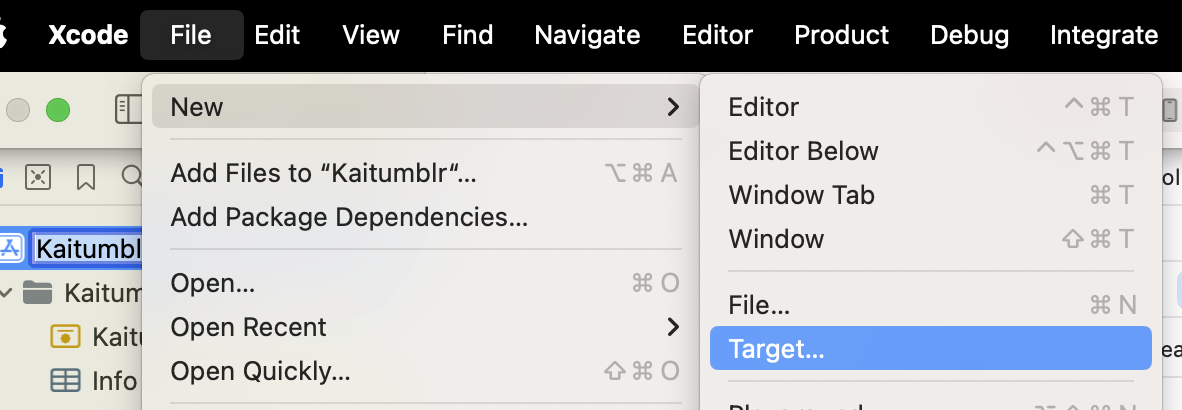
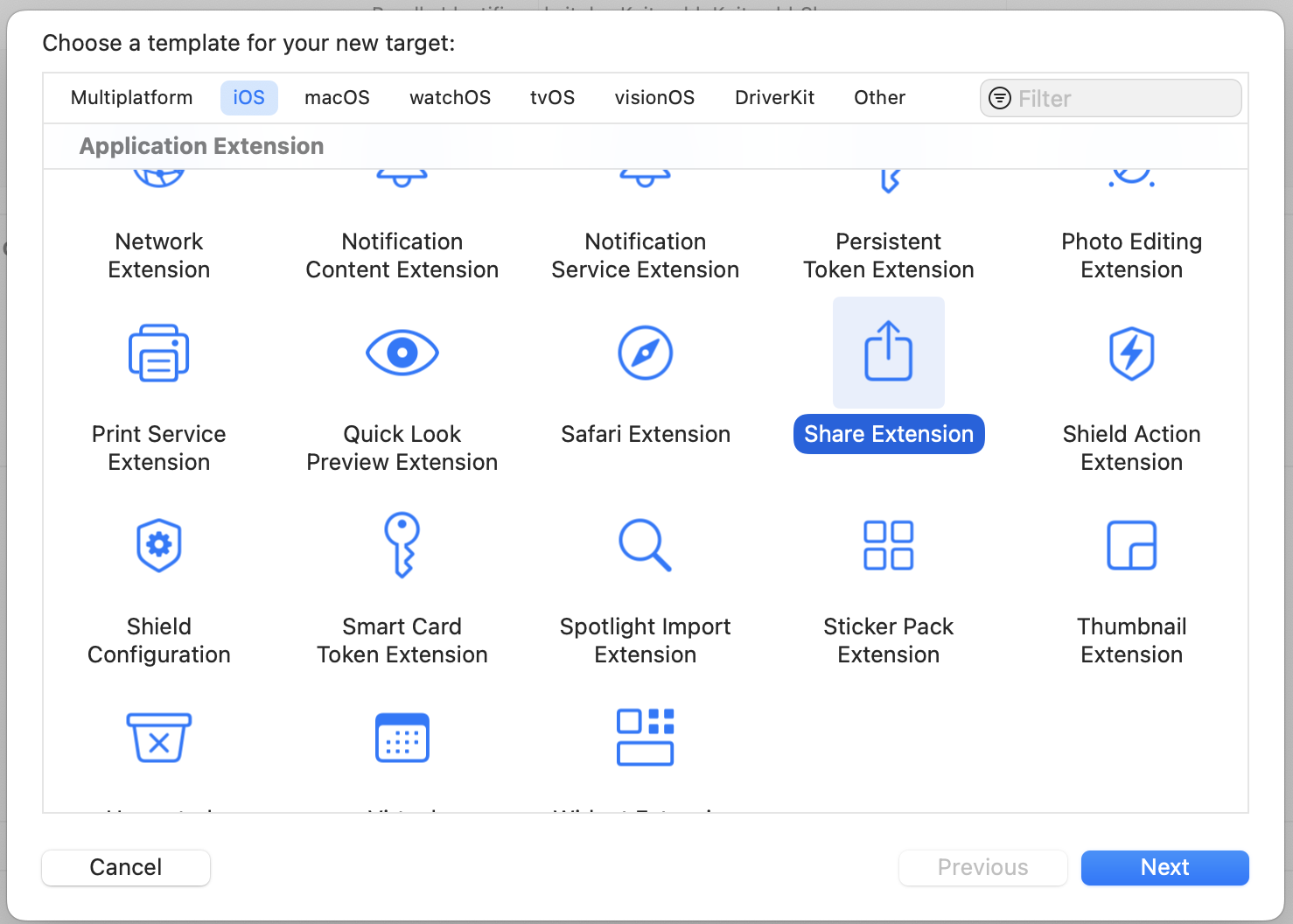 Once you fill out the info, this will create a new directory with a UIKit Storyboard file (MainInterface), ViewController and plist. We're not gonna use hardly any of this. Delete the Storyboard file. Then change your ViewController to use the
  You should be able to use this code as a foundation to accept different inputs and do different things. It's a jumping-off point! Hope it helps.