kait.dev

note Posts

I had an old TV lying around, so I mounted it on my wall vertically. I grew up on StatusBoard, which was especially invaluable in newsrooms in the early aughts (gotta make that number go up!). I figured as I got deeper into self-hosting and my homelab I'd want some sort of status board so I could visualize what all was running, and partially just because everybody gets a dopamine hit from blinkenlights when they buy new stuff.

I was wrong! I in fact don't care what services are running or their status - I'll find that out when I go to use them. And since I mounted it on the wall, it wasn't particularly helpful for actually connecting to the various computers for troubleshooting. So I had to find something to do with it.

I loaded Dakboard on it for a while, which is pretty nice for digital signage. If I actually wanted to show my calendar, I would have stuck with them to avoid having to write that integration myself. But since my calendar already lives on my watch, in my pocket and in my menubar, I decided I didn't need it on the wall as well. And who wants to spend $4 on a digital picture frame???

So I built my own little app. I spun up a plain Typescript project, wrote an RSS parser, connected a few free photo APIs (and scraped the Apple TV moving wallpapers), and connected to my Plex server through Tautulli to get the data about what was currently playing. I got all of it wired up and ...

I hated it. Too much whitespace visible, and I felt compelled jack up the information density to fill the space. Otherwise, it was just sitting there, doing nothing. I for a second half-wished I could just throw up an old iPhone on the wall and be done with it.

And that's when it struck me. Why not use some physical design traits? Though skeumorphism got taken too far after the iPhone was first released, it feels we overcorrected somewhat. There's something to be said for having a variety of metaphors and interfaces and display options.

So that's where my first draft took me.

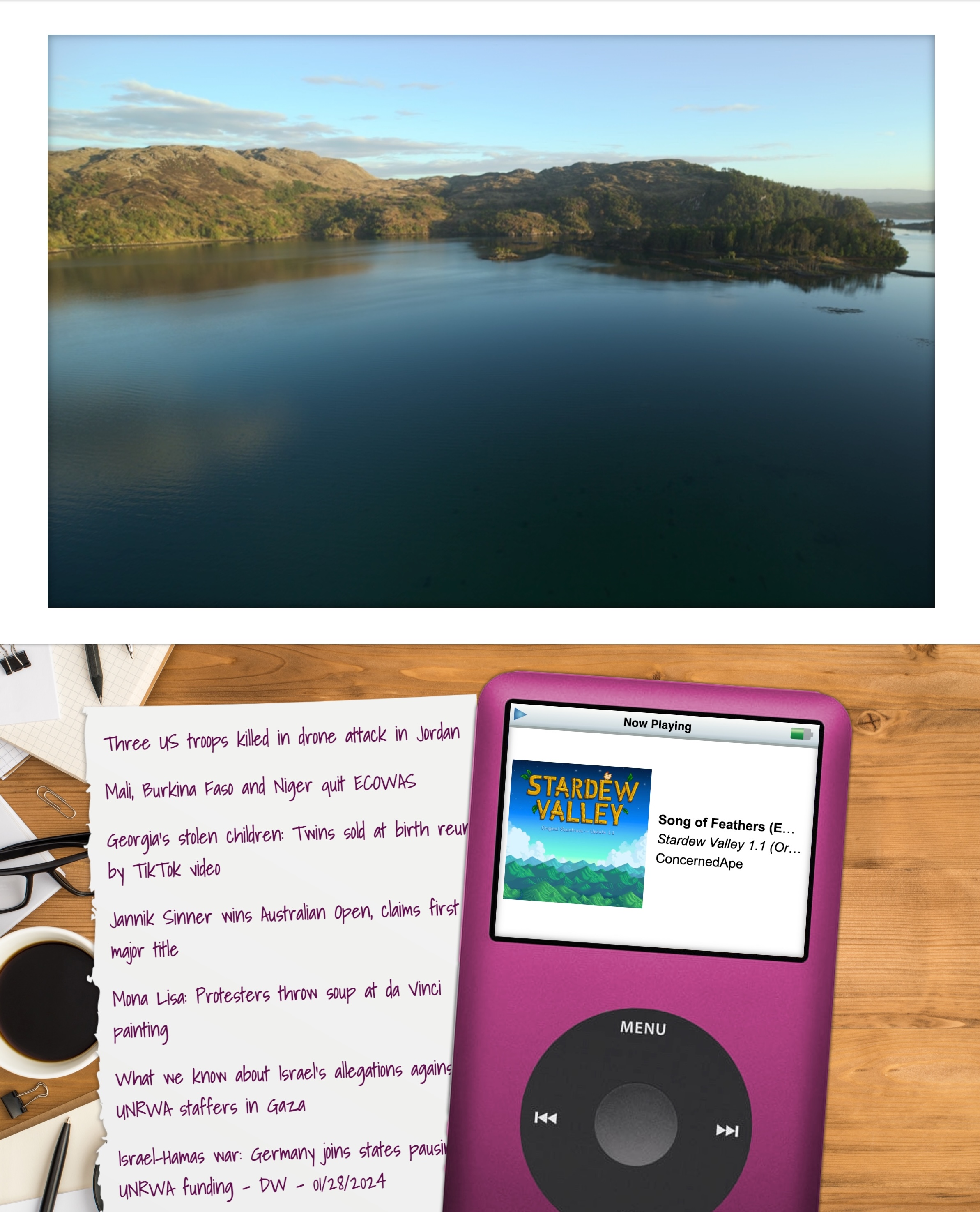
A screenshot of the application. The top half looks like a picture inside a mat, complete with shadow. The bottom looks like a desk, with a piece paper that has headlines written on it slide partially underneath an old iPod Video

Honestly, I really like it! I like the aesthetics of the older iPod, seeing actual layers of things and some visual interest where the metaphor holds together visually. It's giving me serious "faux VR vibes" nostalgia like the software from the early 00s such as Win3D.

But I couldn't stop there. After all, I'd get burn-in if I left the same images on the screen for too long. So, every 12 minutes or so, when the image/video updates, there's a 50% chance the screen will shift to show the other view.

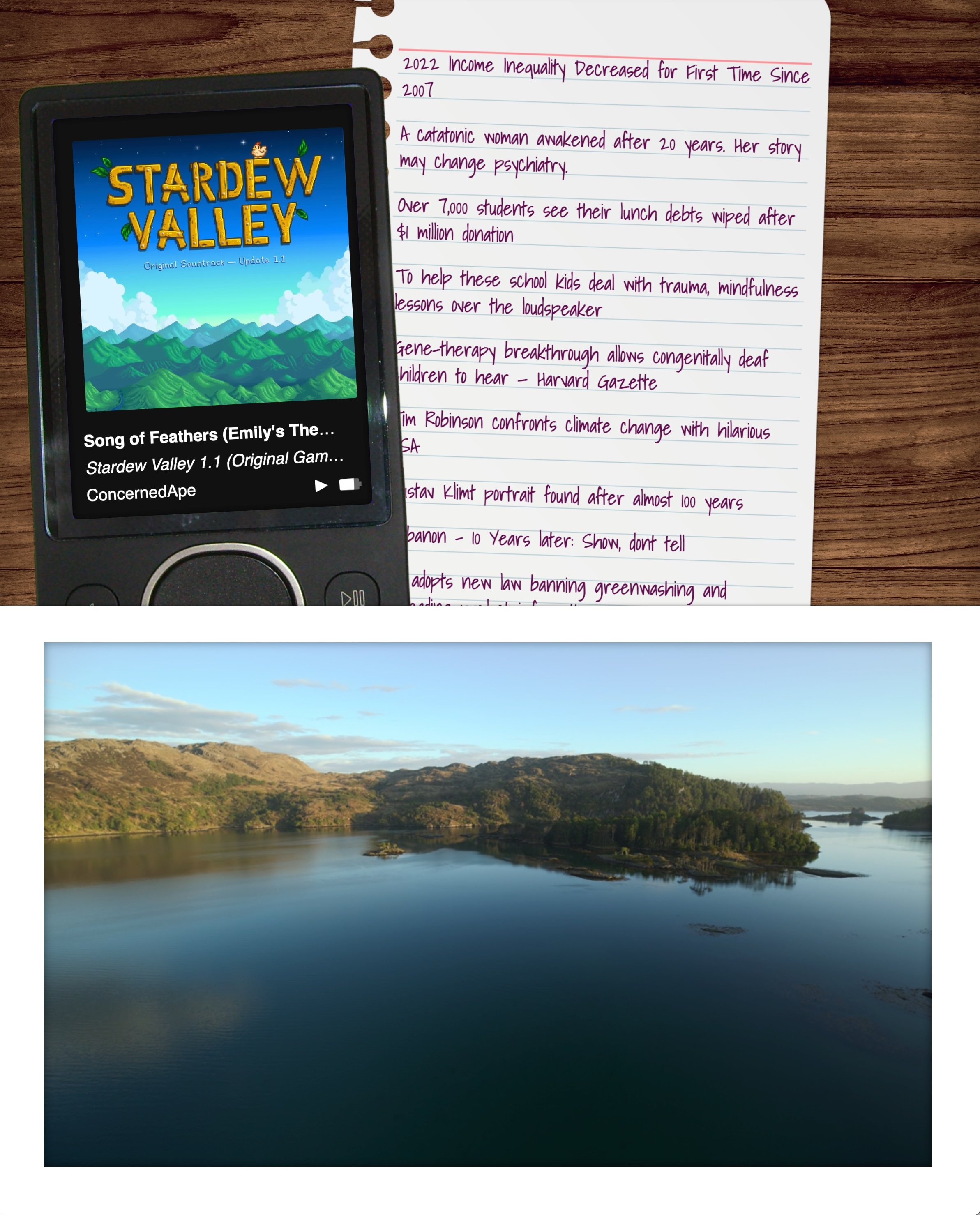
A screenshot of the second mode of the application. The top half has a faux wood grain background with a sheet of notebook paper with headlines written on it, slid underneath a Microsoft Zune MP3 player

No vendor lock-in, here!

Not everything has to use the same design language! Feels like there’s a space between all and nothing. “Some.” Is that a thing? Can some things be flat and some skeuomorphic and some crazy and some Windows XP?

We can maybe skip over Aero, though. Woof.

At some point companies and orgs are going to learn that when you attune so sharply to the feedback loop, you only hear the loudest voices, who are usually a small minority. If you only cater to them, you’re dooming yourself to irrelevance.

This post was brought to you by my formerly beloved TV series Below Deck

I've recently been beefing up my homelab game, and I was having issues getting a Gotify secure websocket to connect. I love the Caddy webserver for both prod and local installs because of how easy it easy to configure.

For local installs, it defaults to running its own CA and issuing a certificate. Now, if you're only running one instance of Caddy on the same machine you're accessing, getting the certs to work in browsers is easy as running caddy trust.

But in a proper homelab scenario, you're running multiple machines (and, often, virtualized machines within those boxes), and the prospect of grabbing the root cert for each just seemed like a lot of work. At first, I tried to set up a CA with Smallstep, but was having enough trouble just getting all the various pieces figured out that figured there had to be an easier way.

There was.

I registered a domain name (penginlab.com) for $10. I set it up with an A record pointing at my regular dev server, and then in the Caddyfile gave it instructions to serve up the primary domain, and a separate instance for a wildcard domain.

When LetsEncrypt issues a wildcard domain, it uses a DNS challenge, meaning it only needs a TXT record inserted into your DNS zone to prove it should issue you the server. Assuming your registrar is among those included in the Caddy DNS plugins, you can set your server to handle that automatically.

(If your registrar is not on that list, you can always use

certbot certonly --manual

and enter the TXT record yourself. You only need to do it once a quarter.)

Now we have a certificate to use to validly sign HTTPS connections for any subdomain for penginlab.com. You simply copy down the fullchain.pem and privkey.pem files to your various machines (I set up a bash script that scps the file down to one of my local machines and then scps it out to everywhere it needs to go on the local network.)

Once you have the cert, you can set up your caddy servers to use it using the tls directive:

tls /path/to/fullchain.pem /path/to/privkey.pem

You'll also need to update your local DNS (since your DNS provider won't let you point public URLs at private IP addresses), but I assume you were doing that anyway (I personally use NextDNS for a combination of cloud-based ad-blocking and lab DNS management).

Bam! Fully accepted HTTPS connections from any machine on your network. And all you have to do is run one bash script once a quarter (which you can even throw on a cron). Would that all projects have so satisfying and simple a solution.

I'm definitely not brave enough to put it on a cron until I've run it manually at least three times, TBH. But it's a nice thought!

Re: Apple’s convoluted EU policies

It's surprising how often D&D is relevant in my everyday life. Most people who play D&D are in it to have fun. They follow the rule - not just the letter of the law, but the spirit.

But every once in a while you'll encounter a "rules lawyer," a player who's more concerned with making sure you observe and obey every tiny rule, punish every pecadillo, than actually having fun.

All the worse when it's your GM, the person in charge of running the game.

But there's one thing you learn quickly - if someone is trying to game the rules, the only way to win (or have any fun) is play the game right back.

For smaller/mid-tier devs, if you're only offering free apps you should probably just continue in the App Store.

But for larger devs who might run afoul of the new guidelines where apps distributed outside the App Store get charged a fee every time they go over a million users?

Oops, Apple just created collectible apps, where if you have Facebook (and not Facebook2), we know you got in early. Think about it: Same codebase, different appId. The external app stores can even set up mechanisms for this to work - every time you hit 999,000 installs, it creates a new listing that just waits for you to upload the new binary (and switches when you hit 995K). Now your users are incentivized to download your app early, in case becomes the big thing. Lower app # is the new low user ID.

If I'm Microsoft, I'm putting a stunted version of my app in the App Store (maybe an Office Documents Viewer?) for free, with links telling them if they want to edit they have go to the Microsoft App Store to download the app where Apple doesn't get a dime (especially if Microsoft uses the above trick to roll over the app every 995K users).

Even in the world where (as I think is the case in this one) Apple says all your apps have to be on the same licensing terms (so you can't have some App Store and some off-App Store), it costs barely anything to create a new LLC (and certainly less than the 500K it would cost if your app hits a million users). Apple's an Irish company, remember? So one of your LLCs is App Store, and the other is external.

To be clear, I don't like this setup. I think the iPhone should just allow sideloading, period. Is all of this more complicated for developers? Absolutely! Is the minimal amount of hassle worth saving at least 30% percent of your current revenue (or minimum $500K if you go off-App Store)? For dev shops of a certain size, I would certainly think so.

The only way to have fun with a rules lawyer is to get them to relax, or get them to leave the group. You have to band together to make them see the error of their ways, or convince them it's so much trouble it's not worth bothering to argue anymore.

Yes, Apple is going to (rules-)lawyer this, but they made it so convoluted I would be surprised if they didn't leave some giant loopholes, and attempting to close them is going to bring the EU down on them hard. If the EU is even going to allow this in the first place.

I'll be hitting the lecture circuit again this year, with three conferences planned for the first of 2024.

In February, I'll be at Developer Week in Oakland (and online!), talking about Data Transfer Objects.

In March, I'll be in Michigan for the Michigan Technology Conference, speaking about clean code as well as measuring and managing productivity for dev teams.

And in April I'll be in Chicago at php[tek] to talk about laws/regulations for developers and DTOs (again).

Hope to see you there!

Who holds a conference in the upper Midwest in March???

Hey everybody, in case you wanted to see my face in person, I will be speaking at LonghornPHP, which is in Austin from Nov. 2-4. I've got two three things to say there! That's twice thrice as many things as one thing! (I added a last-minute accessibility update).

In case you missed it, I said stuff earlier this year at SparkConf in Chicago!

I said stuff about regulations (HIPAA, FERPA, GDPR, all the good ones) at the beginning of this year. This one is available online, because it was only ever available online:

I am sorry for talking so fast in that one, I definitely tried to cover more than I should have. Oops!

The SparkConf talks are unfortunately not online yet (for reasons), and I'm doubtful they ever will be.

WordPress 6.2.1 changelog:

Block themes parsing shortcodes in user generated data; thanks to Liam Gladdy of WP Engine for reporting this issue

As a reminder, from Semver.org:

Given a version number MAJOR.MINOR.PATCH, increment the: 1. MAJOR version when you make incompatible API changes 2. MINOR version when you add functionality in a backward compatible manner 3. PATCH version when you make backward compatible bug fixes

As it turns out, just because you label it as a "security" patch doesn't make it OK to completely annihilate functionality that numerous themes depend on.

This bit us on a number of legacy sites that depend entirely on shortcode parsing for functionality. Because it's a basic feature. We sanitize ACTUAL user-generated content, but the CMS considers all database content to be "user content."

WordPress is not stable, should not be considered to be an enterprise-caliber CMS, and should only be run on WordPress.com using WordPress.com approved themes. Dictator for life Matt Mullenweg has pretty explicitly stated he considers WordPress' competitors to be SquareSpace and Wix. Listen to him.

Friends don't let their friends use WordPress

Note: This site now runs on Statamic

I knew I needed a new website. My go-to content management system was no longer an option, and I investigated some of the most popular alternatives. The first thing to do, as with any project, was ascertain the requirements. My biggest concerns were a) ability to create posts and pages, b) image management, and c) easy to use as a writer and a developer (using my definition of easy to use, since it was my site).

I strongly considered using Drupal, since that's what we (were, until a month ago) going to use at work, but it seemed like a lot of work and overhead to get the system to do what I wanted it to. I (briefly) looked at Joomla, but it too seemed bloated with a fairly unappealing UI/UX on the backend. I was hopeful about some of the Laravel CMSes, but they too seemed to have a bloated foundation for my needs.

I also really dug into the idea of flat-file CMSes, since most (all) of my content is static, but I legitimately couldn't find one that didn't require a NodeJS server. I don't mind Node when it's needed, but I already have a scripting language (PHP) that I was using, and didn't feel like going through the hassle of getting a Node instance going as well.

(Later on I found KirbyCMS, which is probably what I'm going to try for my next client or work project, but I both found it too late in the process and frankly didn't want to lose out on the satisfaction of getting it running when I was ~80% of the way done.)

As I was evaluating the options, in addition to the dealbreakers, I kept finding small annoyances. The backend interface was confusing, or required too many clicks to get from place to place; the speed to first paint was insane; just the time waiting for the content editor to load after I clicked it seemed interminable. At the same time, I was also going through a similarly frustrating experience with cloud music managers, each with a vital missing feature or that implemented a feature in a wonky way.

Then I had an epiphany: Why not just build my own?

I know, I know. It's a tired developer cliche that anything Not Built Here is Wrong. But as I thought it over more, the concept intrigued me. I wasn't setting out to replace WordPress or Drupal or one of the heavy-hitters; I just wanted a base to build from that would allow me to create posts, pages, and maybe some custom ideas later down the road (links with commentary; books from various sources, with reviews/ratings). I would be able to keep it slim, as I didn't have to design for hundreds of use cases. Plus, it would be an excellent learning opportunity, that would allow me to delve deeply into how other systems work and how I might improve upon them (for my specific use case; I make no claim I can do it better than anyone else).

Besides, how long could it take?

Four months later, LinkCMS is powering this website. It's fast and light, it can handle image uploads, it can create pages and posts ... mostly. Hey, it fulfills all the requirements!

Don't get me wrong, it's still VERY MUCH a beta product. I am deep in the dogfooding process right now (especially with some of the text editing, which I'll get into below), but I cannot describe the satisfaction of being able to type in the URL and see the front end, or log in to the backend and make changes, and know that I built it from the ground-up.

LinkCMS is named after its mascot (and, she claims, lead developer), Admiral Link Pengin, who is the best web developer (and admiral) on our Technical Penguins team.

I don't want to go through the whole process in excruciating detail, both because that'd be boring and because I don't remember everything with that many details anyway. I do, however, want to hit the highlights.

  • Flight is a fantastic PHP routing framework. I've used it for small projects in the past, and it was pretty much a no-brainer when I decided I wanted to keep things light and simple. It can get as complicated as you want, but if you browse through the codebase you'll see that it's fairly basic, both for ease of understand and because it was easier to delete and edit routes as separate items.

  • LinkCMS uses the Twig templating system, mostly because I like the syntax.

  • The above two dependencies are a good example of a core principle I tried to keep to: Only use libraries I actually need, and don't use a larger library when a smaller one will do. I could have thrown together a whole CMS in Laravel pretty quickly, or used React or Vue for the front end, but it would have come at the expense of stability and speed, as well as (for the latter two) a laborious build process.

  • I don't hate everything about WordPress! I think block-based editing is a great idea, so this site is built on (custom) blocks. My aim is to have the content be self-contained in a single database row, built around actual HTML if you want to pull it out.

  • One of my favorite features is a Draft Content model. With most CMSes, once a page is published, if you make any changes and save them, those changes are immediately displayed on the published page. At best, you can make the whole post not published and check it without displaying the changes to the public. LinkCMS natively holds two copies of the content for all posts and pages - Draft and Published. If you publish a page, then make edits and save it, those changes are saved to the Draft content without touching the Published part. Logged-in users can preview the Draft content as it will look on the page. Once it's ready, you can Publish the page (these are separate buttons, as seen in the screenshots) for public consumption. Think of it as an integrated staging environment. On the roadmap is a "revert" function so you can go back to the published version if you muck things up too much.

  • One of the things that was super important to me was that everything meet WCAG AA accessibility. Making this a goal significantly limited my options when it came to text editors. There are a few out there that are accessible, but they are a) huge (like, nearly half a megabyte of more, gzipped) and b) much more difficult to extend in the ways I wanted to. Again, with a combination of optimism (I can learn a lot by doing this!) and chutzpah (this is possible!), I decided to write my own editor, Hat (named after Link's penguin, Hat, who wears the same hat as the logo). I'm really pleased with how the Hat editor turned out, though it does still have some issues I discovered while building this site that are in desperate need of fixing (including if you select text and bold it, then immediately try to un-bold it, it just bolds the whole paragraph). But I'm extremely proud to say it that both HatJS and LinkCMS are 100% WCAG AA 2.1 accessible, to the best of my knowledge.

  • Since I was spending so much time on it, I wanted to make sure I could use LinkCMS for future projects while still maintaining the ability to update the core without a lot of complicated git-ing or submodules. I structured the project so that core functionality lives in the primary repo, and everything else (including pages and posts) live in self-contained Modules (let's be real, they're plugins, but it's my playground, so I get to name the imaginary territory). This means you can both update core and modules, AND you only need to have those components included that you're actually using.

  • I used a modified Model-View-Controller architecture: I call the pieces Models, Controllers and Actors. Models and Controllers do what you'd expect. Actors are what actually make changes and make things work. It's easier for me to conceptualize each piece rather than using "View" as the name, which to my mind leaves a lot of things out. I'm aware of the MVAC approach, and I suppose technically the templates are the View, but I lumped the routes and templating in under Actors (Route and Display, accordingly), and it works for me.

I don't think LinkCMS is in a state where someone else could install it right now. (For starters, I'm fairly certain I haven't included the basic SQL yet.) The code is out there and available, and hopefully soon I can get it to a presentable state.

But the end goal of all this was, again, not to be a CMS maven challenging the incumbents. I wanted to learn more about how these systems work (the amount of insight I gained into Laravel through building my own is astounding, to me), and craft a tool that allows me to build small sites and projects, on my own terms, with minimal dependencies and maximum stability.

Mission accomplished.

I set out to build my own CMS in an attempt to circumvent some of the problems I'd had with others in the past. I wound up inventing a whole new set of problems! What a neat idea.

Email newsletters are the future. And the present. And also, at various points, the past. They've exploded in popularity (much like podcasts), hoping that individual creators can find enough people to subscribe to keep them afloat (much like podcasts). It's an idea that can certainly work, though I doubt whether all of the newsletters out there today are going to survive, say, next year, much less in the next 5. (Much like ... well, you get it.) My inbox got to the point where I could find literally dozens of new issues on Sunday, and several more during each day of the week. They were unmanageable on their own, and they were crowding out my legitimate email.

In a perfect world, I could just subscribe to them in Feedly. I am an unabashed RSS reader, with somewhere in the vicinity of 140 active feeds. I am such a hardcore RSS addict that I subscribed to Feedly Pro lifetime somewhere in the vicinity of ... 2013, I think. Gods. It was a great deal ($99), but it means that I miss out on some of the new features, including the ability to subscribe to newsletters. There are also some services out there that seem like they do a relatively good job, but even at $5/month, that's $5 I'm not sending to a writer.

And frankly, I was pretty sure I could build it myself.

Thus was born Newslurp. It's not pretty. I will 100% admit that. The admin interface can be charitably described as "synthwave brutalist." That's because you really shouldn't spend any time there. The whole point is to set it up once and never have to touch the thing again. The interface really only exists so that you can check to see if a specific newsletter was processed.

It's not perfect. There are some newsletters that depend on a weirdly large amount of formatting, and more that have weird assumptions about background color. I've tried to fix those as I saw them, but there are a lot more mistakes out there than I could ever fix. Hopefully they include a "view in browser" link.

Setup is pretty easy.

  • Install dependencies using Composer

  • Use the SQL file in install.sql to create your database

  • Set up your Google API OAuth 2 Authenticaton. Download the client secret JSON file, rename it "client_secret.json" and put it in the project root

  • Navigate to your URL and authenticate using your credentials

  • Set up a filter in your Gmail account to label the emails you want to catch as "Newsletters." You can archive them, but do not delete them (the program will trash them after processing)

  • Visit /update once to get it started, then set up a cron to hit that URL/page however frequently you'd like

That's ... that's pretty much it, actually. It worked like a charm till I started using Hey (which has its own system for dealing with newsletters, which I also like). But it still runs for those of you out there in Google-land. Go forth and free your newsletters!

Check out the repo here.

Loogit me, building the Substack app 3 years too early. And without the infrastructure. OK, I built an RSS feed. But I still saw the newsletter boom coming!

I have used WordPress for well over a decade now, for both personal and professional projects. WordPress was how I learned to be a programmer, starting with small modifications to themes and progressing to writing my own from scratch. The CMS seemed to find a delicate balance between being easy to use for those who weren't particularly technically proficient (allowing for plugins that could add nearly anything imaginable), while also allowing the more developer-minded to get in and mess with whatever they wanted.

I would go as far as to call myself a proselytizer, for a time. I fought strenuously to use it at work, constantly having to overcome the "but it's open-source and therefore insecure!" argument that every enterprise IT person has tried for the past two decades. But I fought for it because a) I knew it, so I could get things done more quickly using it, and b) it did everything we wanted it to at no cost. Who could argue against that?

The problems first started around the WordPress API. Despite an upswell of support among developers, there was active pushback by Matt Mullenweg, in particular, about including it in Core and making it more widely available - especially confusing since it wouldn't affect any users except those that wanted to use it.

We got past it (and got the API into core, where it has been [ab]used by Automattic), but it left a sour taste in my mouth. WordPress development was supposed to be community-driven, and indeed though it likely would not exist in its current state without Automattic's help, neither would Automattic have been able to do it all on its own. But the community was shut out of the decision-making process, a feeling we would get increasingly familiar with. Completely blowing the up the text editor in favor Gutenberg, ignoring accessibility concerns until an outside third-party paid for a review ... these are not actions of product that is being inculcated by its community. It's indicative of a decision-making process that has a specific strategy behind it (chasing new users at the expense of existing users and developers).

Gutenberg marked the beginning of the end for me, but I felt the final break somewhere in the 5.x.x release cycle when I had to fix yet another breaking change that was adding a new feature that I absolutely did not need or want. I realized I was not only installing plugins were actively trying to keep changes at bay, I was now spending additional development time just to make sure that existing features kept working. It crystallized my biggest problem I'd been feeling: WordPress is no longer a stable platform. I don't need new; I can build new. I need things to keep working once they're built. WordPress no longer provides that.

And that's fine! I am not making the argument that Automattic should do anything other than pursue their product strategy. I am not, however, in their target market, so I'm going to stop trying to force it.

A farewell to a CMS that taught me how to program, and eventually how to know when it's time to move on.

Note: This was the write up a of a conference talk given in 2016, and should be considered of its time/not used for current dev practices or advice. Don't use WordPress.

The WordPress REST API is the future! This is something many of us have been saying/believed for about two years, but the future is now! Kind of. The REST API has (finally) been approved for merge into WordPress 4.7, meaning it will be available for use by everyone without requiring a plugin, as has been the case up to this point. Even without the official recognition (and with a not-small barrier to entry), lots of people and companies have done some pretty amazing things with the REST API. So I thought we'd look into the things people have done to get ideas for what the API will be useful for, and other ideas that might be best solved other ways.

For the purposes of this discussion, WordPress can be defined by an easy-to-use, extensible content management system. It powers a staggering amount of the internet, customized in an equally dizzying array of ways, and runs on PHP. The PHP part is often the biggest objection people have, for many reasons (not available in their stack, they don't like the language, etc.).

The two people who are co-leading development on the REST API (Rachel Baker and Ryan McCue) wanted to "future-proof" WordPress by allowing the development of new features and enhancements as well as people who were outside the PHP ecosystem to use WordPress.

That's a longer way of saying, "The REST API was invented so everyone doesn't have to rely on the traditional theming/plugin structure of Wordpress." The infrastructure for the REST API was implemented in WordPress 4.4. The first set of content endpoints (making the API actually useful to anyone) have been officially approved for integration into 4.7. For those still following along, that means that, with the release of 4.7, the following endpoints will be available for read/write:

  • Posts

  • Comments

  • Terms

  • Users

  • Meta

  • Settings (through Options)

Obviously, some of the specific data (such as User information and Settings) are restricted by user. The publicly available API will not return information that is otherwise locked-down in WordPress. Don't forget to install some sort of authentication plugin (Oauth1.0, Oauth2.0, JWT, application passwords, whatever floats your boat), as none made it into the 4.7 update (though they're aiming for 4.8).

In general, the API is going to be godsend whenever you're trying to work with WordPress and you want to break out of the traditional PHP/theme/plugin interface. In good news for the diehard PHP developers out there, you don't have to change a darn thing if you don't want to!

Specifically, I think the best thing going for WordPress right now is its ubiquity and ease of use in creating content. A ton of people have interacted with the WordPress editor at this point, and it's pretty intuitive to anyone who's ever opened Word. It's a fantastic tool to allow people to enter content. And plugins like Advanced Custom Fields or TablePress make filling out what otherwise might be tedious and confusing data (say, product details) remarkably simple. It's then up to us as developers to take that content and make it compelling to whoever's going to be reading it.

Previously, we've been restricted to using the traditional WordPress theme/plugin model — which is not a knock against it! People have built absolutely astounding things using it. But in order to do anything else required XMLRPC or writing your own custom endpoints, for which there was no standard and you'd have to manually include every piece you want.

Probably the biggest change that's going to hit is the ability to craft themes with zero use of PHP. Are you a React developer? Angular? Now, as long as the style.css is set up and loading in the JS files, you can create an entire theme without every having to write a single the_content();. A corollary to this idea is ...

The best part is, since WordPress is no longer chaining your front- and back-end together, it's extremely easy to use WordPress as just one part of your stack and use it only for specific needs it's well-suited for.

I work at the Penn State College of Medicine on our Hershey campus, which encompasses both the college part as well as the Milton S. Hershey Medical Center. The Marketing Department is responsible for both entities. As you can imagine, our tendrils reach all over the place: We run the public web site, the intranet, TV screens all over the place running a bastardization of PowerPoint (the content is a combination of calendar display, events, announcements and tons of other information), print flyers, print brochures, email marketing, signage, news, public events ...

Obviously, we're not going to be able to incorporate ALL of that into one place, and rightfully so — there are legitimate reasons InDesign exists, and we don't need to pull in print production to this process. But the ability to pull our digital together where that makes sense? I'm swooning. WordPress, making its content available through the API, could absolutely be the nervous system that gets all of our content going out to the various appendages from the central brain.

Enter the event in the backend, tag it appropriately, add the image. Now it's on the events calendar website immediately for people to find. Three weeks before it happens, we send out an automated email (using our CRM, not publishing out via MailPoet), push to the intranet and it goes up on the screens so everyone walking around can see it. And the information we send out is standardized and coming from the same location every time. We can integrate it wherever else it makes sense, and let the other systems are already in place work around/with the data.

And that's just my specific use case. Ryan McCue suggested touch-screen museum displays, but the more obvious implementation comes from ...

I'm sure at some point between 2009-2013, we all encountered the "Download our app!" website on a WordPress site that was little more than a basic blog. Someone (many someones, actually) decided that every website should have their own native app.

The easiest way (short of legitimately scraping the content from a website, which is time-consuming/hard) of doing this involved picking up one or more RSS feeds from the site in question and displaying it in a questionably-slightly-easier-to-use format. I worked for a publisher who went through more than the three companies mentioned by link earlier on in this paragraph, and I can tell you there were many aspects that drove us absolutely nuts, almost all related to customization.

We were allowed one (!!) image per article, because that's the standard featured image RSS feeds pump out. We weren't allowed to use JavaScript because they didn't know/didn't care about how to accurately parse the CDATA, and anyway they didn't have the right libraries loaded (or weren't willing to let us load libraries on the page). What we wouldn't have given for the ability to ship them a standard set of JSON, along with whatever custom parameters/images/etc. we wanted, and told them to design for that.

Luckily, even though this is about to get much easier for the average user, I think we as a society will be able to dodge the "have a WordPress site? Get a native iOS app up and running in 10 minutes!!!!" hucksters, simply because most people have already figured out that there's no real advantage (financial or otherwise) to having an app unless you have a reason to have an app. (Also, someone's already doing this.)

But imagine the people who DO need an app. Suddenly you can pull all your product information out of WooCommerce with ease and set it up to support native purchases using the Apple App Store or Google Play Store right on someone's phone (or the Windows Store and Mac Store, I guess, if you're into that sort of thing).

While most of us rightly blanch at the "advantage" of giving someone 30% of revenue, it's simple fact that for a lot of people that defines online shopping. That specific distribution model isn't going to work for anyone, but the ability to liberate information from the core install (and update it back in when something changes) opens up the possibilities for native applications the same way it does for non-PHP languages on the web.

While I will sing the praises of the content editor all day long, I give a deep shudder of foreboding when contemplating what permissions levels to set up for client users. Naturally, they all want to be admins ("It's my site, after all"), and all I can think about is how quickly they'll try to delete plugins, or change the theme ("it's cooler!"), or any number of problems. That doesn't even get to the non-project owners, who still want admin access, or who get lost because "I couldn't find that post!" (because it's a page).

With the endpoints we have now, we will be able to more easily only surface to people exactly what they need to be monkeying with. A content editor can get in and see the content editing screen, and no more. Even better, you can create detailed experiences for users at scale where they can manage their account information without having to drop them into the WordPress backend. Or, you can integrate some of the WordPress account information into wherever the user already is (say, in your ASPX-powered webapp's user screen). The key, as is the recurring theme here, is external extensibility. No longer are we confined to the WordPress sandbox. Speaking of which ...

I'm unapologetic in my love for the WordPress editor, but I recognize that it's not a tool that's going to work for everyone in every situation. Some people really need to see how the content is going to look before they feel comfortable with it, and now they can.

Front-end editing just got a LOT easier. Scrolling through your site and see a typo? If you're logged in, all you need to do is the "edit this page" link, make your edits, save the page, and continue scrolling on. Similarly, this makes applications similar to Calypso available without having to run JetPack. Now you can customize a WordPress iOS app to manage your posts and your custom fields, without having to worry about marrying everything up as you try to sync back.

Many stores (think Sears, or Verizon) now have their employees wandering around with tablets for various reasons: mobile checkout, customer service triage, etc. Let's take customer service triage: one WordPress install, an API-powered screen showing who's registered/approximate waiting time/whatever, backed by a native (or web-powered, doesn't matter) app running on the representatives' tablets that allows them to register and manage the queue.

The exciting part of this is absolutely not trying to get Verizon to replace their system (honestly don't care), but rather the ability to bring it to your grocery store for their meat counter, or maybe your local independent bookseller who wants to showcase different things on screens around her store. It's making the implementation easier on a smaller scale, cheaper, and growing the ability for people who already have an existing skillset to take advantage of it.

The second generation of the web (web 2.0, whatever you want to call it) was built on sharing data and user generated content. There have always been ways to integrate this into WordPress, but a full extensible API blows that out of the water. When I worked at a newspaper, user-submitted photo galleries did huge traffic for us, but we were using a platform that wasn't really designed for photo galleries (and we were going to stop paying for it).

At the time, I built a wrapper around the SmugMug API, but if I had an API for WordPress available at the time I probably would have used that instead. Imagine a drag-and-drop box where you put your photos in, tell us the captions, and they're automatically uploaded to the backend and ready for us to examine and approve them. All of the authentication, administration and admin work would have already been handled out of the box. It's not necessarily creating a whole new paradigm for the internet, but it does extend WordPress' capabilities to meet existing needs, and make it easier on everyone.

Most of the implementations we've been talking about thus far are focused on getting information out of the WordPress install for various purposes — one good one that publishers might want to focus on is AMP, Facebook Instant and Apple News pages. Since you can now grab your data via the API, pushing the information required by those services just got a lot easier. But we're talking about a full REST client, here. Incoming signals can be gathered from whatever other services you're collecting from (Facebook, Twitter, FourSquare, whatever), pushed back into the WordPress database for storage (and then extracted back to whatever you want using the same API).

Supporting WordPress just got a whole lot easier. Doing basic work/upgrades on a bulk scale have gotten easier and easier with automatic updating and WP-CLI, the REST API (if extended to the full use that its founders envision) could accelerate those changes by orders of magnitude. Enter RESTful WP-CLI. This project (which is in very early stages and, as its README warns, "breaking changes will be made without warning. The sky may also fall on your head.") is the type of innovation supported by the API that will save all us tons of time in the future. It automatically extends the REST endpoints into WP-CLI, allowing you to make the same changes from the command line.

The best part is, these tools will allow us to gain benefits even without expensive retrofits of existing sites. I'm certain there exist now organizations that run more than one WordPress installation that's not on multisite (for whatever reason), and don't have the time/money/internal political clout to change that. Simply through core updates to WordPress and the installation of a single plugin (RESTful WP-CLI), you could write a batch script to SSH into your WordPress host(s) and automatically add or delete a user the next time your company makes an HR change, and only have to do it once.

Right off the bat, the REST API will give us numerous ways to automate certain processes, and that number will only grow as the API gradually extends/eats the rest of WordPress' functionality.

It's not all upside, of course. Due to inherent limitations in the current implementation (lack of access to menus, single authentication option), not everything is going to feasible or wise in terms of build-out.

As of when the REST API is integrated into the core, there's not full wp-admin parity baked in. If your project operates outside the traditional theme model, basic structures and actions we've taken for granted such as the permalink and post previews available to users via the backend will no longer work unless the developer goes out of their way to reimplement the basic functionality.

Similarly, menu management is not going to be baked-in, at least in 4.7, which means you're going to need to do a little work (API Menu plugin) or a lot of work (recreating it however works best for you by hand) in order to get those things working. If you're just feeding information into somewhere else that's managing those things, no sweat. But if you're running that information into an iOS app, for example, you're going to need to deal with in one way or another, and the way people are used to (Appearances > Menus) isn't going to work.

That being said, the biggest caution flag I can see for developers is wanting to use the new API where it isn't necessarily needed. As mentioned several years ago in the TL;DR, maybe the project you're working on is specifically so you can see how the REST API works. If so, great, go nuts.

If, however, you're just trying to get the job done and you need to surface related posts inside a regularly-built theme, make sure you actually need to be calling those in via the API versus just including a custom loop in the footer, or something similar. I don't know if most of you know this, but developers of all stripes have a tendency to jump on something and use it for their next project because it's new, or someone said it's faster, or (often) just because it exists. The API enables us to do a lot of cool new things, but it doesn't necessarily need to replace your entire existing workflow. Use the tools best for the job at hand, and plug in new ones as necessary.

While this whole post has been API cheerleading and the ability to stop relying on PHP, I nonetheless want to caution people to think before implementing everything on the client side. There are many useful additions, hacks and modifications you can make on the server side to speed up the client side. Filters, long a valuable asset in the theme/plugin builder's toolbox, are even more so when it comes to the API. The large number of hooks available give you options, and it's up to you exploit them.

A project I did had a number of Advanced Custom Fields attached to a custom post type, including an image (with caption) and a relationship field to another post. With the proper hooks, I was able to transform the single call for an "event post" type to include the image, caption, the full content of the relationship post, and all of its ACFs. One call, all the info I needed (and I did need all the info every time I called it). A roundabout way of saying that just because PHP isn't necessarily going to be what you use to build the majority of the project, it doesn't mean you should discard it entirely. Your current WordPress skills aren't going by wayside, you're just finding new ways to augment them.

Examples mentioned

Resources

  • Github Repo - The repository for the questions theme from php[world]

  • Plugins - WordPress plugins to extend the REST API

  • Ionic — a mobile UI framework (Angular-based)

  • Vienna — iOS native editor for WordPress (React Native)

  • WP REST API React/Redux helpers — data-management helpers for React and Redux as Node modules

  • node-wpapi — WordPress REST API client for JavaScript

Oh wow, young Kait had a lot more faith in the WordPress ecosystem than was warranted.

It’s probably the most standard Twitter profile text outside of ostensibly nubile 22-year-olds who are “just looking for a guy to treat me right” — “Retweets are not endorsements.” Journalists, who are among the more active Twitternauts, like to pretend they exist outside of normal human functioning like judgment and subjectivity, and thus use this phrase to let everyone know that just because they put something on their personal (or corporate-personal) account, it doesn’t mean THEY actually think that thing. They’re just letting you know. It’s FYI.

It’s bullshit.

This is the ignore-the-obvious-fiscal-advantage argument that’s given whenever people wonder why the media focuses on inane, unimportant or crazy stories that even most journalists are sick of — sometimes even on air. We know that you posted the story about the celebrity because people will click on the link about the celebrity. It’s why the concept of clickbait headlines exist: it’s certainly not for the reader’s benefit. Journalists have ready-made reasons (read: excuses) as to why they post tripe, and the closest they ever get to the truth is “because people will read them.” . They’re just trying to inform people!

With the democratization of communication accelerated by the internet, “major media” no longer holds any meaningful gate-keeping role in deciding what people should know about. You can lament or celebrate this information as you may, but most would not argue with the truth of it. There are simply too many outlets through which you can acquire information, be it personal feeds from social media, websites, TV channels, magazines, etc. If someone wants to get their message out into the world, there are ample ways to do this.

Let’s take, for example, an American neo-Nazi group. Their message is that the white race is superior and other races should be subjugated/deported/killed. They might have a Twitter account, a website, a magazine, whatever. The main point is, none of these mediums have the ability to reach out to people. Sure, they can tweet @ someone and force their way in, but for the most part the way people interact with their message is through (digital or actual) word-of-mouth from those who espouse those beliefs, or by seeking them out directly.

But what happens when, say, a major party presidential candidate retweets some of their views? It by no means indicates that the candidate himself is a white supremacist or in any way sympathetic to those points of view. But it does give the jerks a voice. It lets people who may similarly not be white supremacists or sympathizers be exposed to that person, and provides them a vector to that information. Clicking on the Twitter handle to see the white supremacist’s past tweets opens the door. The person who goes through it is not automatically going to become a skinhead … but perhaps that Twitter user is adept at using misleading rhetoric and subtle innuendo to draw people down the path.

None of this makes it the candidate’s fault (or the candidate a racist [UPDATE: Except when it does, don't slow-walk that nonsense, Past Me]), but the root cause is undeniable.

So what does this have to do with the media? The sole ability any publication/outlet has is to determine what information they think their readers should know. They cannot make their readers know this information anymore than the presidential candidate or the racist twit can make anyone pay attention to them. All they can do is put the information in front of those who let them. It’s exactly the application of, “You can’t control what other people think, you can only control what you do,” only this time it has nothing to do with telling your child that some people are just mean.

The story is whatever the story is, and by printing a story in the newspaper, airing it on your broadcast network or pushing it to your audience via Facebook, your website, YouTube, etc., the publisher/creator is saying “This is a thing that is worthy of attention.” Especially if you’re not going to put any effort into context (which is what a retweet is), you’re explicitly stating to your audience that this is a thing they should know about. In an “attention economy,” with a surfeit of content and not enough eyeballs, getting someone to look at you goes a big way toward your winning (whatever it is you’re trying to win).

Thus, tweets like this:

Newsrooms insisting, "No, re-tweets ARE endorsements" have really said: we don't trust our journalists or our users. http://t.co/gX923Ej9rN

— Jay Rosen (@jayrosen_nyu) July 11, 2014

are actively missing the point. No one’s saying you absolutely believe 100% in whatever you retweet. But it’s disingenuous to argue that there’s no value to the original tweet by your retweet. Hell, if there wasn’t, there would be no point in your retweeting it at all.

Haha, remember when we assumed Trump wasn't a white supremacist? Simpler times.

As a person whose life is consumed by the digital world, this feels an exceptionally strange piece to write. I spend the vast majority of my day on a device, whether that’s a computer for work (I’m a web developer, no escaping it) or a phone/computer/tablet for whatever (likely cat-related) thing I happen to be internetting in my free time.

So you can understand my internal consternation when confronted with a situation that makes me lean toward limiting technology. I’m more than a little worried about technology, both for the reaction it’s drawing as well as its actual impact it’s having on society as a whole — and not just because three out of every four stories on every single news site is about Pokemon Go.

But we’ll get there. First, let’s start with something more mainstream.

Technology (and, more specifically, apps/the internet) are famous for disruption. Tesla’s disrupting the auto industry. So’s Uber. AirBnB “disrupted” the hotel industry by allowing people to rent out rooms (or entire houses) to perfect strangers. The disruption in question (for hotels) was that they no longer were the combination of easiest/cheapest way to stay in a place away from home. But there was also “disruption” in terms of laws/regulation, a fight AirBnB is currently waging in several different locations.

Some of these fights revolve around leases — many landlords do not allow subleasing, which is what some people do on AirBnB: Rent out a space they rent from someone else for a period of time. AirBnB asks that people confirm they have the legal right to rent out the space they’re listing, but there’s no enforcement or verification of any kind on AirBnB’s part. AirBnB thus, at least in some non-small number of cases, is profiting off of at best a breach of contract, if not outright illegality. Then there’s the fact that anyone, be they murderer, sex offender or what have you, can rent out their space and the person renting the room may be none the wiser.

And maybe these things are OK! Maybe it should be caveat emptor, and the people who ultimately lose out (the actual lessees) are the ones primarily being harmed. But that ignores the people who were just trying to rent from AirBnB and had to deal with an irate landowner, or the property owner who has to deal with the fallout/repercussions of the person breaking the lease.

The clichéd technical model of “move fast and break things” should have some limits, and situations where people are dying need more foresight than “we’ll figure it out as we go along.” Otherwise, how do we determine the appropriate death toll for a new tech service before it needs to ask permission rather than forgiveness? And before you dismiss that question as overbearing/hysterical, remember that actual human beings have already died.

But not everything is so doom and gloom! Why, Pokemon Go is bringing nerds outside, causing people to congregate and interact with one another. It’s legitimately fun! Finally my inner 10-year-old can traipse around the park looking for wild Pikachu to capture. Using augmented reality, the game takes your physical location and overlays the game on top of it. As you walk around with your phone, it uses your GPS location to pop up various Pokemon for you to capture. There are also Pokestops, which are preset locations that provide you with in-game items, located in numerous places (usually around monuments and “places of cultural interest”). There are also gyms in similarly “random” places where you can battle your Pokemon to control the gym.

And no deaths! (Yet, probably.) But just because no one is dying doesn’t mean there aren’t still problems. Taste-wise, what about the Pokestop at Ground Zero (or this list of weird stops)? Business-wise, what about the Pokestop near my house that’s in a funeral home parking lot? You legally can’t go there after-hours … but Pokemon Go itself says that some Pokemon only come out at night. What happens during a funeral? There’s no place where businesses can go to ask to be removed as a Pokestop (and frankly, I can imagine places like comic book stores and such that would pay for the privilege). And who has the right to ask that the 9/11 Memorial Pool be removed? Victims’ families? There’s an appropriation of physical space going on that’s not being addressed with the seriousness it should. Just because in the Pokemon game world you can catch Pokemon anywhere doesn’t mean, for example, that you should necessarily allow have them popping up at the Holocaust Museum.

I would like to preempt arguments about “it’s just an algorithm” or “we crowd-sourced” the information by pointing out that those things are useful in their way, but they are not excuses nor are they reasons. If you decide to crowd-source information, you’d better make sure that the information you’re looking for has the right level of impact (such as the names of boats, or in Pokemon Go’s case, the locations of Pokestops). Some of these things can be fixed after the fact, some of them require you to put systems in place to prevent problems from ever occurring.

In this case, you can cast blame on the players for not respecting the law/common sense/decency, and while you’d be right, it shifts the blame away from the companies that are making money off this. What inherent right do companies have to induce people to trespass? Going further, for some reason doing something on “the internet” suddenly cedes rights completely unthinkable in any other context. Remember the “Yelp for people” that was all but an app designed to encourage libel, or the geo-mapping firm that set the default location for any IP address in the US to some Kansan’s front yard. These were not malicious, or even intentional acts. But they had very real affects on people that took far too long to solve, all because the companies in question didn’t bother (or didn’t care) about the real effects of their decisions.

At some point, there’s at the very least a moral — and should be legal, though I’m not necessarily advocating for strict liability — compulsion to consider and fix problems before they happen, rather than waiting until it’s too late. The proper standard probably lies somewhere around where journalists have to consider libel — journalists have a responsibility to only report things they reasonably believe to be accurate. Deadlines and amount of work are not defenses, meaning that the truth must take priority over all. For places where the internet intersects with the real world (which is increasingly becoming “most internet things”), perhaps a similar standard that defers to the reasonably foreseeable potential negative impact should apply.

Technology is only going to grow ever-more entrenched in our lives, and as its function moves closer to an appendage and away from external utility, it’s incumbent upon actors (both governmental and corporate) to consider the very real effects of their products. It (here meaning “life,” “work” or any number of quasi-existential crises) has to be about more than just making money, or the newest thing.

One of my pet peeves is when people/corporations speak as there's a legal right to a use a given business model. "Well, if it were illegal to train AIs on copyrighted material, we wouldn't be able to afford to do it!" Yes ... and?

We’re all pretty much in agreement that racism is bad, yes? Even most casual racists will usually accede this point, right before clarifying how their racism isn’t actually racism. Or something.

But what, then, to do with the people who say bigoted things (be they related to race, gender, or whatever)? The easiest path would be to simply ostracize them, mock them, or otherwise diminish their roles in society. And this gets done all the time! (Ask Twitter.) And sometimes those (publicly, at least) repent of their ways and pledge to do better in the future, and life goes on.

And sometimes those people are dead.

(Please note: The views represented in this piece are intended to apply only to those who have already died. For living authors/comedians/people of note, it's a whole different situation.)

Woodrow Wilson is in the news again, because his name adorns the Princeton School of Public Policy and International Affairs. Wilson — the 28th president, Nobel Peace Prize winner, and a president of Princeton University — was also unequivocally, unquestionably racist. Because of this fact, Princeton students have demanded that Wilson’s name be taken off all programs and buildings.

Again, the easy path is simply to take his name off the building. But how do you erase a president from history? For that matter, how do you justify removing the name of the man who dreamed up the League of Nations (the forerunner to the United Nations) off of a school of international affairs? A man that won what is considered the biggest prize in human history (the Nobel Peace Prize) because of his work in international affairs?

To wit: how do you separate the man from his work?

I just finished The Secret History of Wonder Woman, a book more accurately titled The Secret History of the Creator of Wonder Woman, that dovetails quite nicely with this debate. William Marston was a failed psychologist/moviemaker/entreprenuer/inventor who created Wonder Woman.

The early comics (authored by him, before his death in 1947, were chock-full of progressive feminist ideals: WW solved problems by herself (never waiting for Batman or Superman to save the day); She actively refused marriage to her boyfriend; Her female friend, Etta Candy, on several occasions helps WW subdue her male foes.

The feminist ideal manifested itself in more obvious ways, too: WW shows a young boy the important role of women in history, WW helped the namesake of her alter ego out of an abusive relationship, and the earlier comics even included an insert printing of “Wonder Women of History,” a four-page adventure chronicling the lives of women such as Florence Nightingale, Susan B. Anthony and Helen Keller. Sounds like a pretty cut-and-dried case of progressive values that deserve to be lauded.

Of course, I wouldn’t have included it as an example without a very large “but." Marston married his wife, Elizabeth Marston, in 1915. He had an on-again, off-again relationship with Marjorie W. Huntley that his wife knew about — and lived permanently (along with Elizabeth and, infrequently, Huntley) with Olive Byrne, whom he presented with golden bracelets as an “anniversary gift”. (The bracelets are the inspiration for WW’s, and are thought to have symbolized their private “marriage.") Byrne’s role in the triad was to raise the children — eventually, two of her own and two by Elizabeth.

There’s nothing inherently wrong or bad about their living arrangement, of course — peoples’ private lives are their own. But one is forced to at least ponder the impulses for creating WW by a man who publicly claimed — in 1942, no less — that women would rule the world after a literal battle of the sexes … as he was financially supported by one wife and had a second at home who was tasked with taking care of the children. It’s entirely possible that Byrne desired this life and had no problem with it. It’s also possible that it’s the only arrangement Elizabeth would agree to.

Then there are the many, many instances of bondage WW undergoes, undergirded by Marston’s belief that women were naturally more submissive than men. But it was OK, because men could learn submission from women, who would rule over them with their sexiness: The only hope for peace is to teach people who are full of pep and unbound force to enjoy being bound ... Only when the control of self by others is more pleasant than the unbound assertion of self in human relationships can we hope for a stable, peaceful human society.

So was Marston a feminist? Or was he a sex-craved submissive longing for a dom? In either case, how does that change Wonder Woman? The answer, of course, is that it doesn’t. Authorial intent is absolutely important for discovering the reasons why something is written and for discerning its influences, but ultimately the work itself is judged by the individual reader.

It absolutely can make a difference in how the work is read (in that an individual will bring their own prejudices and biases just as they do in every instance of human reason), but only as much as the reader wants it to. Cultures and mores change. The esteem historical figures are held in wax and wane when they’re looked at with eyes that have seen the impact of past ignorance.

Some, like Christopher Columbus, are doomed to be relegated to the bigot wing of history because their accomplishments (finding a continent the vikings discovered hundreds of years earlier) are overshadowed by the way they accomplished them (indiscriminate slaughter and enslavement of indigenous people). Others, such as Abraham Lincoln, get their mostly exemplary record (freed the slaves!) marred by simply being of a certain time period (“... I will say in addition to this that there is a physical difference between the white and black races which I believe will forever forbid the two races living together on terms of social and political equality.”) and adopting a progressive stance (for the time), but still not getting all the way there.

That’s a good thing.

Historical figures and events are never as black and white as they’re presented in history classes. Shades of gray exist everywhere, just as they do in your everyday life. We present them simplistically for a variety of reasons, but nobody’s perfect.

So what do we do with Wilson? It’s never wrong to have a debate, to illuminate the issues of the past and the present. As to whether the name gets removed ... meh? Honestly, if the students are the ones who have to use it and they care so much, why not change it?

Buildings will ultimately crumble, institutions ultimately fail and time marches inexorably along. The best we can do is respect the past while always remembering that the needs of the present outweigh those of the dead. Events happen, with real consequences that need to be considered. But, ultimately, people are rarely all good or all bad. They are, after all, people.

And this was before JK Rowling went full TERF!

I like technology. I think this is fairly obvious. I like it personally because it removes a lot of friction points in my life (some in ways that other people appreciate as more convenient, some in ways that are convenient only to me). But the downside of technology is that businesses use it as a way of not paying people for things that actually often do require human judgment.

The proper way most systems should be set up for, say, a medical insurance claim is that you fill out everything electronically so the data is in the right place and then an actual human can make an actual human judgment on your case. In practice, however, you fill out the form and the information whisks away to be judged by a computer using a predetermined set of rules.

If you're very, very lucky, there might be a way for you to appeal the computer's ruling to a human being (regardless of outcome/reason) — but even then, that person's power is often limited to saying, "well, the computer said you don't pass."

The following story is by no means of any actual consequence, but does serve as a prime example of how to waste your money employing customer service people. I recently switched banks. When I was at the branch doing so, I asked out of curiosity if they allow custom debit cards (my girlfriend has a credit card that looks like a cassette tape, and is always getting compliments on it. I'm petty and jealous, so I want a cool card, too).

Finding out the answer is yes, I waited until my actual debit card came so I can see the pure eye-rending horror that is their color scheme before sitting down and trying to make my own. I wasn't really looking to lose a good portion of my day to this endeavor, so I used the Designer's Prerogative to begin.

I wanted something computer-y (see above, re: my opinion on technology), so I started with this (royalty-free) stock image. Their design requirements say the PeoplesBank logo has to be large and colored (dark red for Peoples, gray for Bank), so I swapped the colors on the image and flipped it so the faux-binary wouldn't be covered by the big VISA logo or hologram (see the image at the top of the post).

It's not a masterpiece, it's not like I slaved over it for hours. It's just a cool design that I thought would work well. Upload, and send!

Three hours later, I got an email: SORRY — your design wasn't approved!

We regret to inform you that the image you uploaded in our card creator service does not meet the guidelines established for this service, so it has not been accepted for processing. Please take a moment to review our image and upload guidelines at www.peoplesbanknet.com and then feel free to submit another image after doing so.

Huh. Well maybe I ran afoul of the design guidelines. Let's see, competitive marks/names, provocative material (I don't think so, but who knows?), branded products ... Nope. The only thing that it could possibly even run afoul of is "Phone numbers (e.g. 800 or 900 numbers) and URL addresses (e.g. www.xyz.com)", but since it's clearly not either of those things, I figured it would be OK.

So I called up PeoplesBank and explained the situation.

"Hi, I was wondering why my custom card design was rejected."

"Well, it should have said in the email why it was rejected."

"Yes, it says 'it does not meet the guidelines established for the service.' I've read the guidelines and there's nothing in there that would preclude this. It's just an abstract image with some binary code, and it's not even real binary, it's just random 1s and 0s."

"Please hold."

[5 minutes pass]

"OK, it says the copyrighted or trademarked material part is what it ran afoul of."

"It's just numbers and an abstract image. How could that be the problem?"

"That's what it says."

"OK, well, is there someone somewhere I can talk to who would be able to tell me what I need to alter in order to make it acceptable?"

"Please hold."

[10 minutes pass]

"OK, you said something about the numbers? Something about by Mary?"

"Yes, it's binary code. Well, it's not even really binary, it's pseudo-binary."

"Well, that's it."

"What's it? It's just random 1s and 0s. It's the equivalent of putting random letters in a row and saying they're words."

"Apparently it's copyrighted."

"... OK, well, is there someone who can tell me what I need to change? Because I doubt that, even if I changed the numbers around and submitted it, it would still go through. I just need to know why it's not going through so I can change it so it does go through."

"Oh, we'll need to research that. Is there a number I can call you back at?"

My best guess is that somehow this is getting tripped up as an allusion or reference to The Matrix by some content identifier program somewhere, which a) it's clearly not, b) The Matrix wasn't actually binary, and c) you can't copyright the idea of code on a screen. The computer identified as such, and since no one actually knows why it thought that, no one can tell me how to fix it.

And since it's such an important business case (not getting sued for copyright infringement, even though there's absolutely no way VISA is getting sued even if someone puts Mickey on their damn credit card), no one is actually empowered to overrule the computer.

What I'll probably end up doing is just trying another image (I was thinking maybe a motherboard) because at this point I've already spent more time than I actually care about the design of my debit card. It's just frustrating.

I sincerely hope I don't have to update this post.

AI will definitely fix all of this. One of my favorite go-to lines whenever I encounter a dumb bug or computer doing something stupid is, "but we should definitely let computers drive cars by themselves."

Frustration is a natural part of doing ... well, anything, really. Especially when you're picking up something new, there's almost always a ramp-up period where you're really bad, followed by gradual progression. You know this. I know this.

It's kind of obvious to everyone who's ever played a sport, an instrument or tried anything even remotely skilled. There's room for natural talent to make things a little easier, of course, but even LeBron James went through a period (much earlier and much shorter than the rest of us) where basketball was something new he had to get good at.

There are various schools of thought on how to approach this: Some believe people should be allowed to develop at their own pace and just enjoy the activity; others believe that screaming things at children that would make drill sergeants blush is the best way to motivate and/or teach them. Personally, I think the right approach falls somewhere in the middle (though toward the non-crazy side), depending on age, experience and what the person in question wants.

**All of which is a long-winded way of saying that a not-insignificant number of people who play videogames online are absolutely terrifying human beings. **

When I get the chance lately, I've been picking up and playing Rocket League, a game best described as "soccer with cars that have rockets in them." From a gameplay perspective, there's a decent amount of strategy involved that combines soccer with basketball. The single-player AI is pretty easy to defeat, though it does allow for a nice ramp-up of abilities and skills. Then there's the online portion.

Before this month, there were just random matches you could join (from 1x1 up to 4x4) and play against other people. Some of those people are clearly wizards, because they fly around and use the angles to pass and score from places that I would have trouble even mapping out on paper.

In this initial period, the random matches I joined (which is to say I didn't join any guilds or teams, just random online play, so there's some bias there) were mostly fun, occasional blowouts (in both directions) that often involved no more chatter than the preset options ("Great pass," "Nice shot," "Thanks," "Sorry," etc.).

Then, with an update this month, Rocket League rolled out rankings. Now you can play "competitively" in a division (stratified tiers to ensure that people of like ability play against one another) and receive an overall score of your skill level. And boy do a lot of people seem to think it's somehow indicative of their worth as human beings.

I play where everyone starts, in the unranked division. You start with 50 points and win/lose between 6-10 points per game you play, depending on the team outcome (important note). I currently bounce around the mid-to-upper part of this unranked tier, which is probably pretty accurate (I'm OK, but have moments where I screw up).

For the first few games I played, it was interesting watching the different skill levels (from brand new or just-out-of-single-player to pretty skilled players) interact with one another fairly frictionlessly. There'd be some frustrating boneheaded moves that might cost you a match, but it generally appeared to just be accepted as part of playing on a randomized team. When I played yesterday, though, things seemed to be getting ugly.

The first two matches went fine — a win, a loss. Then I got a string where I was teamed up with what one can uncharitably describe as spoiled babies.

In unranked play, the first one happened when I came out too far forward on defense and let a goal go by. Unquestionably my fault, which is why I shot off a "Sorry" to my teammates. "Fuck don't miss the fucking ball," was what I got in response.

We had another goal scored on us during the vagaries of play, as happens, because the other team was better than us. That's when my teammate got mad. "God you're terrible. You must be doing this on purpose."

Which isn't bad, as internet rantings go. It just caught me off-guard. He proceeded to score relatively soon after that to tie things up, and I flashed a "Nice shot!" to him. "fuck off, [gamertag]."

Um, OK.

In the very next match, we scored a quick goal to go up 2-1 when someone from the other team asked if they had removed a feature (he used more obscenities than my paraphrase). He then proceeded to rant about the "shit physics implementation" and how "he totally had it 100% locked-in."

Of course, given that he was typing all this while the game was still going, his team wound up giving up a few more goals, but his point definitely got made.

After an uneventful game following that, the last one involved a (clearly) new player whiffing on defense, and three players from both teams proceeded to disparage the player with accusations of "trolling" — losing on purpose — to the point where he just literally stopped playing. His car just remained motionless on the field.

It's easy to sit back and wonder about why they take it so seriously — "it's just a game" — but that's a simplistic answer. I have no problem with taking games seriously, and there's no reason to prevent people from getting (appropriately) upset when something bad happens.

It's that modifier, though. "Appropriately." I'm not going to take issue with obscenities (or grammar). This is objectively a bad way to play games. Because, of course, you can't earn points if you don't win. And regardless of how bad (or new) someone is to the game, it's almost always better to have an additional player on the field trying to help you win. It's bad strategy and tactics to just heap abuse on poor players — a fact the game understands, which is why one of the preset communication options is "No problem."

It all essentially comes down to treating other humans as humans. I'm not casting broad aspersions about gamers, teenagers or even teenage gamers. Just a note that digitizing all interactions seems to have the broad effect of dehumanizing interactions, unless specific tactics are employed.

I don't know how to educate these people — I'm just someone flying a car around in a videogame. But I made my attempt. After the reprimand for complimenting the guy on his shot, I decided to help the only way I could: I chased down an errant shot by the other team and knocked it in our goal in overtime.

My girlfriend says it was a little petulant — I disagree, but not too strenuously. I broadcasted a message after the shot: "No matter how bad your teammates are, it's better to have them then not."

Is the guy going to change his actions? Probably not. But at least there was some negative reinforcement (losing ranking points). Maybe next time he'll at least keep his frustrations to himself. That, in my books, counts as a win.

a) It was definitely petulant, and b) imagine thinking anyone wants to read about you playing videogames poorly??

Election night is always tense in a newsroom - even when, as the case with the Pennysylvania governor's race, the outcome isn't in doubt, there are still so many moving parts and so many things that can change. Whether it's a late-reporting county/precinct or trying to design a front page you've been thinking about for weeks, there's always something that can go wrong. That's why, this year, I tried to prep my part of the election coverage with as few manual moving parts as possible. Though (as ever) things did not go according to plan, it definitely provided a glimpse at how things might run — more smoothly — in the future.

I set out in the middle of October with two aspects of the coverage. The first, live election results, was something I've been in charge of since the first election after I arrived at the York Daily Record in 2012. I've always used some combination of Google Docs (the multi-user editing is crucial for this part, since our results are always scattered around various web pages and rarely scrape-able) and PHP to display the results, but this year I had my GElex framework to start from (even if I modified it heavily and now probably need to rewrite it for another release).

The results actually went incredibly smoothly and (as far as I know) encountered no problems. Everything showed up the way it was supposed to, we had no downtime and the interface is as easy I can conceivably make it. You can take a gander at the public-facing page here, and the Sheet itself here. The one big improvement I made this time around was on embeds. Though there's always been the ability to embed the full results (example), this year — thanks to the move to separate sheets per race — it was possible to do so on a race-by-race basis.

This helps especially in consideration with our print flow, which has always been that election stories get written so the exact vote totals can be inserted later via a breakout box. By embedding the vote totals into the story, this meant we didn't have to go back in and manually add them on the web.

The governor's race stole pretty much all the of the headlines (/front pages) in York County owing to its status as Tom Wolf's home county. For us, this meant we'd be doing twice as many live maps as usual. The county-by-county heat map is relatively cliché as political indicators go, but it's still a nice way to visually represent a state's voters.

Since he's a native, we also decided this year to include a map of just York County, coding the various boroughs and townships according to their gubernatorial preferences. My first concern was online — we've done both of those maps in print before, so worse case scenario we'd be coloring them in Illustrator before sending them to press.

I wanted interactivity, fidelity, reusability and (if at all possible) automation in my maps. When it came to reusability and fidelity, SVG emerged as the clear front-runner. It's supported in most major browsers (older flavors of IE excepted, of course), on mobile and scales well.

The other options (Raphael, etc.) locked us down paths I wasn't really comfortable with looking ahead. I don't want to be reliant on Sencha Labs to a) keep developing it and b) keep it free when it comes to things like elections and maps. I would have been perfectly fine with a Fusion Table or the like, but I also wanted to look at something that could be used for things other than geocoded data if the need arose.

Manipulating SVGs isn't terribly difficult ... sometimes. If the SVG code is directly injected into the page (I used PHP includes), it's manipulable using the normal document DOM. If you're including it as an external file (the way most probably would), there are options like JQuery SVG (which hadn't been updated in TWO YEARS until he updated it less than a week before the election, or too late for me to use) or this method (which I was unable to get to work). (Again, I just cheated and put it directly on the page.)

Manipulating fills and strokes with plain colors is fairly easy using jQuery, just change the attributes and include CSS transitions for animations. The problems arises when you try to do patterns, which are much different.

I wrote a tiny jQuery plugin (pluglet?) called SVGLite to assist with this, which you can read more about here. When backfilling older browsers, I figured the easiest thing to do was serve up PNG images of the files as they existed. Using everyone's favorite PHP library for ImageMagick, imagick, this was trivial. Simply running a few PREG_REPLACEs on the SVG file before serving it to Imagick helped me get the colors I needed.

It turns out there aren't a lot of free options for scraping data live, and as I've mentioned before, free is pretty much my budget for these sorts of things. But there is one. Import.io, which has the classic engineer's design problem of making things more difficult by trying to make them easier, turned out to be just what we needed when it came to pulling down governor's data.

Working off the results site for each county, I set up a scraper API that trolled all 67 pages and compiled the data for Wolf and Corbett. This was then downloaded into a JSON file that was served to the live Javascript and PHP/ImageMagick/PNG maps. Given that I didn't want to abuse the election results server (or melt ours), I built a small dashboard that allowed me to control when to re-scrape everything.

This part actually went almost as well as the live results, with one MASSIVE EXCEPTION I'll get to after the next part. The boroughs/townships data presented its own problems, in the form of only being released by PDF.

Now, running data analysis on a PDF is not terribly difficult — if you're not time-constrained, I'd definitely recommend looking into Tabula, which did an excellent job of parsing my test data tables (2013 elections), as well as the final sheet when it was all said and done.

Unfortunately, processing each one took about 45 minutes, which wasn't really quick enough for what we needed. So we turned to the journalist's Mechanical Turk: freelancers and staff. Thanks to the blood, tears, sweat and math of Sam Dellinger, Kara Eberle and Angie Mason, we were able to convert a static PDF of numbers into this every 20 minutes or so.

It's always a good idea to test your code — and I did. I swear.

My problem did not lie in a lack of testing, but rather a lack of testing using real numbers or real data. For readability purposes, the election results data numbers are formatted with a comma separating every 3 numbers, much in the way numbers always are in non-financial or -computer contexts (e.g., 1,000, 3,334,332).

UNFORTUNATELY, when I did all my testing, none of the numbers I used went above 1,000. Even when I was scraping the test data the counties were putting up to test their election results uploading capabilities, the numbers never went above 500 or so — or, if they did, they were tied (1,300 for Wolf, 1,300 for Corbett).

The problem lies in how the scraper worked. It was pulling all of the data as a string, because it didn't know (or care) that they were votes. Thus, it wasn't 83000, it was '83,000'. That's fine for display purposes, but it's murder on mathematical operations.

About an hour after our first results, the ever-intrepid and knowledgeable Joan Concilio pointed out that my individual county numbers were far too low - like, single or double digits, when the total vote count was somewhere north of 200,000. After walking all of my numbers back to import.io, I realized that I needed to be removing the commas and getting the intVal() (or parseInt(), where appropriate).

(I also originally intended to provide the agate data using the same method, but the time it took to quash the number bug meant it was safer/wiser to go with the AP's data.)

Conclusion:

  1. Always test your data.

  2. Always make sure your data matches the type you're looking for.

  3. Sometimes the overhead of statically typed languages is worth the trouble.

Overall, everything went fairly well, with the exception of the aforementioned bug report (which also made us double- and triple-check the print graphic). The advantage of SVG, aside from its digital flexibility, was that after a quick Save-As and conversion in Illustrator, we had a working print file ready to go.

Another election, in the books.

I thought I was soooo smart linking to everything, except now all the links are dead and useless.

As I've mentioned before, we're moving away from Caspio as our database provider to the extent that it makes sense (not out of utility, it's a function of cost). While we've managed to get some things migrated over, one of the biggest stumbling blocks are the things we use Caspio for the most — simple databases that need to be viewable and searchable online.

We have a number of semi-complex databases (read: more than a single-sheet XLS file) that we're not moving anytime soon (deed transfers database, among others, simply because of how we ingest the data), but there are a number that are little more than spreadsheets that we need to be able to view and search.

We investigated a number of vendor alternatives, but most featured pricing problems similar to Caspio, or had records limits absurdly lower than what we need. (Example: One such service offered 100,000 rows of data for $149/month. For comparison, one of our more popular databases, listing Pennsylvania teachers' salaries, has well over 2 million rows alone.) So, once again, Project Time™.

There is one thing that any aspiring programmer must realize when they set out to replace a tool: YOU CAN'T REPLACE A TOOL AT THE HEART OF A MULTI-MILLION DOLLAR CORPORATION ON YOUR OWN. I knew this academically but, as is often the case when setting out on these adventures, my brain chose to heed that advice only when it was convenient to do so.

I often live by the mantra, "If someone else can do it, that means it's possible." It works well something like 75 percent of the time — it prevents me from feeling daunted when facing large projects, but it can be turned around as well.

My favorite caveat is, "Technically, I could build you a reasonable facsimile of Facebook — it just wouldn't be as good, fast or as useful as the real thing."

It's true in that somebody built Facebook, but (more accurately) thousands of somebodies built Facebook. It's doable, it's just not feasible for one person to replicate it completely on their own.

That being said, Past Me was convinced it couldn't be THAT difficult to take a spreadsheet and present it online, despite the fact that people routinely pay up to and including hundreds/thousands of dollars per month to companies to be able do exactly that.

Ah, hubris.

The first priority involved figuring out how to store the data. The reason the York Daily Record likes Caspio so much is not just its versatility and usefulness, it's how easy it is to use. Caspio spent a lot of time and money into figuring out an interface that, while not everyone can use it and even fewer can take full advantage of all its features, it's easy enough that most people can do basic things with little training. This actually posed the greatest challenge — the data needed to be able to be input and edited in such a way that your average reporter (think 35-year-old metro reporter, not 23-year-old working at The Verge) would be able to do so without having to email/call me every five minutes. That ruled traditional databases out right away. (Which is not to say that you can't build an edit-friendly MySQL frontend, but I didn't have that kind of build time for this project.)

The easiest and cheapest way forward seemed to be (as ever) through Google. Though I'm becoming more wary of Google Docs' live-editing capabilities, for the purpose of "storing data and being able to edit it directly," Sheets fit the bill.

Because our CMS does not allow for server-side code inclusion (another story for another time), inserting the data into articles needs to be accomplished via JavaScript drop-in. Since we're going to be building it in JS anyway (and I'm a firm believer on not doing the same work twice unless I forget to commit something to the repository), I figured we'd just use one codebase for both the widget version and the standalone.

After a little bit of searching (I got burned out going through a dozen different Caspio alternatives), I settled on DataTables as our jQuery plugin of choice.

Here's the part where I always have trouble when trying to relate the struggles of the average newspaper's newsroom to the more digital-focused newsrooms who have multiple app developers and coders on staff — most newspaper reporters do not have the coding ability beyond making a link or typing into the TinyMCE in WordPress.

You can get them to do things like a YouTube embed using a tag interface [Youtube: https://www.youtube.com/watch?v=jvqfEeuRhLY], but only after some heavy-duty brainwashing (and we still struggle with getting Excerpts right).

So while I and probably three or four in our newsroom have no problem using Quartz's excellent ChartBuilder, it's not something we can just send out to the general population with a "use this!" subject line and expect results.

While some might be content with a simple "Use DataTables!" and inserting some code to auto-activate the tables when people set them up properly, asking your average journalist to use JavaScript parameters is a fool's errand, and we're not even within driving distance of, "Oh yeah, and get your Sheet into JSON for DataTables to use."

Which is not to call them stupid — far from it. It's just that these are people who spent a bunch of time (and, likely, money) to learn how to write stories properly. Then they got to work anytime after 2005 and discovered that it wasn't enough — they have to learn Twitter, Facebook, an ever-increasing number of content managements systems and (oh yeah!) they still have to do it while writing their stories. All of this is doable, of course, but to ask them to learn HTML and JavaScript and every new thing someone invents (which even I have given up all hope of keeping up with; there are just too many new things out there) is simply untenable.

Thus, I consider it my number one job to make their jobs easier for them, not just give them something complicated they have to learn just because it does a new thing (or an old thing in a cooler/cheaper way).

For the first version, it's about as simple as can be. People work on their data using their own preferred Google accounts (work or personal), leaving them with a document they can play around with. Once they're to a point where they're ready to present the data to the public, we copy the data into a separate account. This has the advantage of a) keeping the data under our control, in case the reporter quits/leaves/dies/deletes their account, and b) allows the reporter to keep their own copy of the data with the fields they don't want shown to the public (internal notes, personally identifying information, that sort of thing). The reporter then grabs the sheet ID from the URL and puts it in the tool.

Assuming the data passes some very basic tests (every column has a header, only one header row, etc.), they're presented with a list of fields. Because our CMS frontend does not allow for responsive design, all our information lives in 600 pixel-wide boxes. So with a little help from jQuery Modal, I added some functionality to DataTables using the standard hidden fields that hides some columns in the standard presentation, but shows the entire entry's information in a modal if a row is clicked.

For version 1, search is pretty simple: If there's a field, it's searchable. We're hoping to expand on that in later iterations to not search certain fields, as well as create some method of specifically searching fields (as seen in this Caspio implementation). Users then add a title (shown only in the full version; we're assuming wherever the widget drop-in goes, there's already a headline on the article) and customized search text.

They're then taken back to the main screen, where they can find links to the full data page (like this, which we use for our mobile implementation (neither our apps nor our mobile site executes JavaScript, so we always have to include links to a place off our main domain for our mobile readers to view) as well as the drop-in widget code.

Eventually, we hope to add some things like the extended search functionality, a "download data" option and other enhancements. But for now, we feel like we have a tool for basic database work.

10 years later, the projects for the GameTimePA URLs are still live and running, but the main newspaper's domain isn't. But they're pointing to the same server!

It all started with FlappyArms.sexy. For those not in the know, it’s an experiment by the NYTimes’ Alastair Coote to clone FlappyBird — the twist being that, instead of using arrow keys or swipes on a phone, you load the game in a desktop/laptop browser, then connect to it with your phone.

Using the sensors in your phone, it detecs when you flap your arms and moves the bird accordingly. I came across it when he tweeted out a link, and immediately played it for an hour.

About a week later, Managing Editor Randy Parker dropped by to ask what I was going to do at our booth at the 2014 edition of the York County Fair. Previously, reporters and editors used their time at the booth to connect with the community in their own ways. Politics reporters might interview a politician live, our graphic artist offered up sketches one year, and this year our photo editor planned a photo walk, taking members of the public around the fair and explaining some of the basic concepts of photojournalism (and helping them compose great shots). Parker specifically said he wanted to make sure that people were doing something that really spoke to what they did/their interests.

I wasn’t lying when I replied with, “Well, the only thing I can think of doing is throwing up FlappyBird and showing people the possibilities of technology.” He even would have let me go along with it, too, I bet.

Then Community News Coordinator Joan Concilio told me about an idea they had for the fair. They envisioned a setup whereby people could tell us the things they thought that made York County special, then display them on a big screen throughout the fair.

Show people what journalism is, what interactive journalism can be. Show them it’s not all “a reporter shows up, talks to people, goes away and later something appears on the website/in the paper.” Show them that journalism can be curation from the public, soliciting input and feedback instanteously, that comes together in a package with our deep knowledge and library of photos of the area.

And I thought, “Damn. That sounds like FlappyArms.sexy, except actually relevant to journalism. I gotta get in on that.”

Together on a Tuesday, we worked out that we’d need a submission form and a display (pictured above and below) for the answers, a curated set of photos from our archives and the #yorkfair feed from Instagram. They also wanted to incorporate it long-term into their blog, Only in York County, which we did here. Oh, and the Fair started Friday morning.

Everything actually went fairly quickly. After looking at a number of jQuery image slider plugins, I ultimately wound up building my own owing to the fact that a) none of them did full-screen very well, since the plugins were by and large designed to work on actual sites, not what amounts to a display, and b) I wanted to be able to insert the newest answers immediately, if I had time to build the feature.

We could have done a quick-and-dirty build that was tech-heavy in operation, but we wanted to leave the display/capture running even when we weren’t there, and that required making things a little more user-friendly. The data was stored in Google Sheets (something we’re likely to move away from in the future, as I ran into a number of problems with Google Apps Scripts’ ability to work with selected cells on a sheet. That bug in and of itself isn’t a huge problem, but that it hasn’t been addressed in so long is worrisome in the extreme), with a custom function for updating or deleting entries (since we were using push and not refreshing the page).

The Instagram API was, as ever, a dream to work with, and a cinch to pull stuff in (cited and referenced back to Instagram properly, of course). Even the part I was worried about, the Push notification, was a cinch to institute thanks to Pusher. Highly recommended, if you can afford it — we could, because this required a relatively small number of push clients open (just the display computer + anything I was testing on at a given time, so we used the sandbox plan). There are a number of self-hosted open-source options — though, if we have need of one and I can’t convince them to pay for Pusher, I’m going to consider Slanger, which uses the Pusher libraries. (Seriously, cannot push Pusher enough).

In fact, the biggest challenge of the buildout was how to handle multiple push notifications that came in either at the same time or relatively close to each other. The easiest route was to just have the second message override the first, the third push out the second, etc. But the entire point of the exercise was to show people that they could be a part of the journalism immediately, and we didn’t want to discourage multiple people from submitting at once.

Thus, the dequeue() function was born — on the first submission, set a timeout that will restart the interval that was paging through the extant items. If a push comes in while that timeout is set, queue the data, get the time remaining, set a new timer (same variable) for the time remaining to fire dequeue again. If no new pushes come before then, take the item out of the queue, use it, and set a new timer to dequeue again (if there’s anything else in it) or restart your main action if there’s not.

It was what you’d call a “hard-and-fast” deadline: Our contract with Caspio for database and data services was changing on July 1. On that day, our account — which to that point had been averaging something like 17GB transferred per month — would have to use no more than 5GB of data per month, or else we’d pay to the tune of $50/GB.

Our biggest data ab/user by far was our user-submitted photo galleries. A popular feature among our readers, it allowed them to both upload photos for us (at print quality) to use in the paper as well as see them online instanteously. Caspio stored and displayed them as a database: Here’s a page of a bunch of photos, click one to get the larger version.

We had to come up with something to replace it — and, as ever, without incurring m/any charges, because we don’t have any money to spend.

Requirements

  • Allow readers to upload photos (bonus: from any device, previously limited to desktop)

  • Store photos and accompanying metadata (name, address, contact info, caption, etc.)

  • Display photos and selected metadata (name, caption) on multiple platforms

  • Allow for editing/deletion after upload

  • Low/no startup or ongoing costs

  • Support multiple news properties without much cost for scaling

  • DO NOT create additional work

Research

There are a number of image hosts out there, of course, but the terms of use on their accounts vary wildly. The two main hosts we looked into were Flickr and Photobucket. Photobucket had the advantage of being Not Yahoo, which was a plus in my eyes, but their variable pricing structure (not conducive to multiple accounts, difficult to budget for the future) and lack of apparent developer support (the page you’re directed toward to set up an account no longer exists) made that seem unwise.

Flickr offers 1 TB of storage for reasonable pricing, but a hard request limit (3600/hour) and reasonable usage request (“You shall not use Flickr APIs for any application that replicates or attempts to replace the essential user experience of Flickr.com”) kind of limited its appeal to use a gallery host. Well, there went that idea. Then we started looking at resources we already had.

A few years ago, Digital First Media provided its news organizations with the nifty MediaCenter installations developed at the Denver Post. MediaCenter is an SEO-friendly, easy-to-use WordPress theme/plugin combo that stores its data in SmugMug, another photo storage site we’d looked at but abandoned based on price. But, you see, we already had an account. An in. (A cheap in, to the delight of my editor.) Once we clarified that we were free to use the API access, we decided to do what the pros do: Build what you need, and partner for the rest. Rather than build out the gallery functionality, we’d just create SmugMug galleries and MediaCenter posts, and direct uploaded photos there.

Challenges

The official SmugMug API is comprehensive, though … somewhat lacking in terms of ease of use. Luckily, someone created a PHP wrapper (PHPSmug), which works, more or less. (There are a few pitfalls, in terms of values not corresponding and some weirdness involving the OAuth procedure, but it’s all work-through-able.)

The whole point of user-generated photos is that you want to have the content live forever on the web, but keeping 400 “Fourth of July”-esque-specific categories around in the upload list is going to frustrate the user. We decided to treat categories in two ways: Active and Inactive. Once you create a gallery, it never goes away (so it can live on in search), but you can hide it so it doesn’t necessarily jump in the user’s face all the time.

Print workflow was especially important to us, as one of the major goals of the system was to not create additional work. Due to circumstances out of my control, the server we have to work with does not have email functionality. Using a combination of Google Scripts and some PHP, we weaseled around that limitation and email the original uploaded photo to our normal inbox for photo submissions, thus not forcing the print workflow to require using the web interface.

Allowing uploads from mobile devices is almost a cinch since both Android and the later flavors of iOS support in-browser uploads. The whole thing was built off responsive Bootstrap, so that was the easiest part of the whole project.

One of the biggest reasons we have a photo uploader and web gallery in the first place is to reassure people that when they submit a photo to us, we received it. This helps to prevent a deluge of phone calls or emails inquiring whether we in fact received the photo and when we plan to run it. Having the web gallery gives the user instant notification/gratification, and allows us to remind them gently that we don't have the space to print every photo we receive — but you can certainly view them online.

Method

On the backend, we have one database containing three cross-indexed tables — one to hold authentication info (per property), one for the category info and one for the photos themselves. Because we're using SmugMug as the storage system, there's no need to hold the actual photo ourselves (which helps with data usage from both a storage and transfer perspective). All the photo storage table has to hold is the information for retrieving it from SmugMug.

The user navigates to a specific property's upload form, fills it out and uploads the photo. The component parts of the form are stored separately as well as combined into our standard user-caption format. The caption is used when we send the photo to SmugMug, but we also store it locally so we can sync them up if changes need to be made. The photos are directed to the gallery specified by the user.

After a certain amount of time (about 5 minutes on SmugMug's end, and anywhere from 15-30 minutes on our gallery's end because of the massive caching it was designed with), the photo automatically appears on our photo gallery site. From the backend, users are able to create or retire categories, edit photo caption information and delete photos.

There's hope that we'll be able to do things like move photos around or create archive galleries, but that's down the road, if we have the time.

Results

You can view the final product here, here, here or here (spoiler alert: They’re almost exactly the same). There are still features we’d like to add, but there were more fires to put out and we had to move on. Hopefully we can come back to it when things settle down.

My first big in-house migration to save money!